Holiday Glow in the Trunk
Quick answer: Holiday Glow in the Trunk is a Christmas photo style that places you in an open car trunk surrounded by fairy lights, wrapped presents, and a red velvet mini dress with white fur trim. Using PiXmas, you upload one photo and the app generates a stylized portrait with warm bokeh lighting, suited to Christmas cards, wallpaper, or a cozy seasonal keepsake.
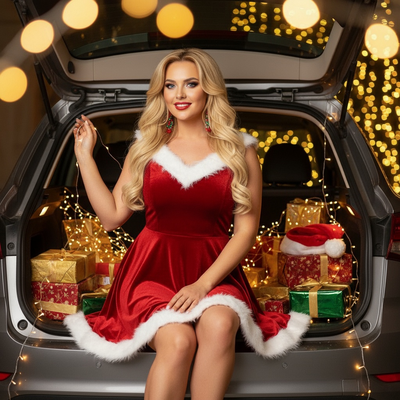
Create beautiful Christmas pictures with our Holiday Glow in the Trunk style.
Welcome to the enchanting world of "Holiday Glow in the Trunk," where your cherished memories shine as brightly as the twinkling Christmas lights. Imagine this: a cozy, magical setting with your loved ones nestled in the open trunk of a car, surrounded by beautifully wrapped presents and a Santa hat perched nearby. This intimate scene is brought to life with the help of our AI Christmas Photo Studio, ensuring each Christmas Portrait radiates warmth and joy. This setup is more than just a photo, it's a sentimental journey that captures the essence of festive holiday spirit.
Create Enchanting Christmas Photos Instantly
Whether you're planning to capture the perfect Christmas Pictures to turn into a timeless Christmas Card or simply want to update your Christmas Wallpaper, the AI Christmas Photo Studio is your go-to solution. It automatically adapts and enhances your uploaded photos into ultra-realistic portraits. Picture yourself or your family comfortably arranged amidst glowing fairy lights and festive decor, all while wearing a charming red velvet mini dress adorned with white fur trim. This unforgettable setting is guaranteed to evoke smiles, making it ideal for framing, sharing, and even gifting.
Get Creative with the Fairy Light Trunk Setup
With the lure of golden fairy lights and bokeh sparkle, this setup is truly a feast for the eyes. The AI Christmas Photo Studio adeptly positions you or your loved ones in the open trunk, blending realism with festive fantasy. Add to this scene your finest earrings and a touch of red lipstick, and you have the perfect festive ensemble. Capture the spirit of the season in Christmas Photos that emanate joy and enchantment, ideal for creating memorable Christmas Wallpaper that everyone will adore.
Personalize Your Festive Photoshoot
The best part of our AI Christmas Photo Studio is the ease with which it personalizes each shot. Once you upload your photo, the technology adapts it seamlessly, whether featuring a single person or a group. Picture those bokeh lights as they dance around the red velvet attire, creating a visual symphony that celebrates the warmth and love of the holidays. Tailor each photo for your Christmas Card or as a seasonal keepsake, capturing moments that family and friends can hold dear.
Set the Mood for Christmas Magic
As the winter evenings draw in, let the glow of the trunk's fairy lights set a captivating mood that embodies Christmas magic. The AI Christmas Photo Studio crafts each shot with precision, offering quality that transforms simple snapshots into narrative-driven Christmas Pictures. Whether these photos become cherished Christmas Wallpapers or part of your festive gallery, their gentle luminosity and festive charm will light up any space or heart.
Conclude the Year with Stunning Holiday Cheer
As the year winds down, these holiday memories captured in the trunk setup are a warm way to celebrate and reflect. The AI Christmas Photo Studio makes it effortlessly easy to create and share these images with friends and family, whether for a surprise Christmas Card or a new Christmas Wallpaper.
What makes this style different from other Christmas photo styles?
Holiday Glow in the Trunk relies on a warm, bokeh-heavy fairy light backdrop staged around an open car trunk rather than a fireplace, snowy street, or studio backdrop. The scattered wrapped presents and soft golden glow create a more intimate, cinematic mood than a typical posed Christmas portrait.
What photo should you upload for the best result?
A clear, forward-facing photo with even lighting and a visible face gives PiXmas the most detail to work with when building the trunk scene around you. Solo portraits or couple photos tend to render most accurately, since the app can focus on facial features while it generates the fairy lights, wardrobe, and props. Blurry or heavily shadowed source photos usually produce softer results.
Who is this Christmas photo style best for?
This look suits anyone who wants a softer, more romantic holiday portrait rather than a classic Santa-and-sleigh scene. It works well for couples, solo portraits meant for a greeting card, or a small family who wants a cozy, warm-toned image. Because the scene is built around one styled outfit and a trunk setting, it holds up best with one or two people rather than a large group.
How does PiXmas compare to a photographer or DIY setup?
- Google’s Holiday Trends reports that many Christmas‑related queries in the US, including decorating and baking topics, spike each December, illustrating that demand for Christmas imagery and content concentrates late in the year. (Google – Holiday Trends (Year in Search 2025), 2025)
- Photography educators using Google Trends report that searches for terms like “Christmas card photos” remain fairly constant through much of the year, then trend upward from September or October and spike in December. (Tech Photo Guy – Google Trends for Photographers, 2018)
- A general guide to using Google Trends recommends setting multi‑year ranges to spot seasonality, noting that Christmas‑related terms consistently show seasonal spikes that can guide when to publish holiday photo content. (Cemoh – How to Use Google Trends: A Complete Guide, 2026)
Limitations
Holiday Glow in the Trunk images from PiXmas are AI-generated stylized photos, not physical pictures taken at a real car or studio set. Fine details like text, jewelry, or background objects may occasionally look imperfect. Photos with multiple faces may render with less consistency than solo or couple uploads, since the app has more facial detail to interpret at once. Results depend on the clarity and angle of your original photo.
For a warm, romantic holiday portrait without booking a photographer or staging real fairy lights, PiXmas turns one uploaded photo into a Holiday Glow in the Trunk scene suited to cards, wallpaper, or a cozy keepsake.
Frequently asked questions
What is the Holiday Glow in the Trunk Christmas photo style?
It is a Christmas portrait style that places you or your family in an open car trunk styled with fairy lights, wrapped presents, and a red velvet outfit with white fur trim, creating a warm, bokeh-lit holiday scene.
Can I use a photo with more than one person for this style?
Yes, PiXmas can process group photos, though solo or couple photos tend to render with more consistent facial detail. Larger groups may see slightly less accuracy across every face in the trunk scene.
Can I include my pet in the trunk photo scene?
Some users upload photos with a pet alongside them, and PiXmas will attempt to include it in the generated scene. Results can vary more with animals than with a solo human portrait, so treat it as a fun option rather than a guarantee.
What kind of source photo works best for this style?
Use a well-lit, forward-facing photo where your face is clearly visible. This gives PiXmas the clearest reference to build the fairy light trunk scene and red velvet wardrobe around you.
Can I turn this into a Christmas card or wallpaper?
Yes, the Holiday Glow in the Trunk output from PiXmas is a standard image file, so it works well as a printed Christmas card, a digital greeting, or a phone and desktop wallpaper.
Do I need real fairy lights or props for this photo?
No physical setup is required. PiXmas generates the fairy lights, trunk, and presents around your uploaded photo, so there is no need to stage props, lighting, or a real car.