Frozen Lake Reflections Christmas Pictures
Quick answer: Frozen Lake Reflections is a PiXmas Christmas photo style that places your subject on a glistening frozen lake at sunset, with pink-gold sky, lantern glow, and icy reflections. PiXmas is an iOS app that turns one uploaded photo into a stylized holiday portrait using AI, with 800+ styles available including this one, ready for cards or wallpapers in minutes.
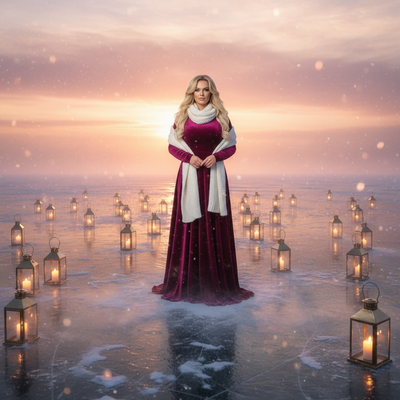
Create beautiful Christmas pictures with our Frozen Lake Reflections style.
The holiday season is upon us, and what better way to capture its magic than with the enchanting Frozen Lake Reflections photo style? Picture yourself or your loved ones poised on a vast, glistening frozen lake, surrounded by a panorama that shimmers like a dream. At the AI Christmas Photo Studio, we transform your photos into winter wonderlands, creating Christmas Pictures that are ethereal and awe-inspiring. Each image becomes a tranquil scene of quiet beauty, perfect for a Christmas Card or as a stunning Christmas Wallpaper. Dive into this immersive experience where every detail, from the soft pink-golden sky to the delicate reflections in the ice, crafts a portrait that resonates with the heart's warmth amidst the chilly embrace of winter.
The Magic of Frozen Lake Reflections
Imagine the serene beauty of a frozen lake at sunset, where every element portrays a sense of peace and wonder. With the AI Christmas Photo Studio, this magic becomes a reality in your Christmas Photos. The key lies in the setup: snowy mist hovering lightly above the ice, blending with a sky set aflame by the fading sun. Each lantern's glow dances across the icy surface, creating reflections that are both mystical and mesmerizing. This setting brings a quiet richness to your Christmas Pictures and invites viewers to step into a world where nature and wonder meet.
Wardrobe That Enhances the Scene
The wardrobe choice in your Frozen Lake Reflections photo is crucial to the overall impact of your Christmas Photos. Imagine a long wool coat that stands out against the icy surface, or a flowing gown that seems to whisper in the gentle breeze. Scarves add warmth and texture, their colors standing out against the serene landscape. Each garment is more than just clothing; it's a storytelling tool that captures the essence of the winter season. With the right attire, your portraits from the AI Christmas Photo Studio become timeless Christmas Pictures that evoke the spirit of the holidays.
Lighting and Mood: Crafting the Perfect Atmosphere
Lighting plays a pivotal role in capturing the tranquil, ethereal mood of Frozen Lake Reflections. The sunset gradient light is enchanting, casting a warm, inviting glow across the scene. This gentle illumination, combined with a soft snow haze, creates a soothing ambiance that feels otherworldly. The resulting Christmas Photos highlight your natural features while carrying a sense of calm and wonder. As an extra touch, the reflections on the ice add depth, making your Christmas Pictures both captivating and lifelike, a fitting addition to your seasonal Christmas Card collection.
Creating Memorable Christmas Wallpapers
Once your image from the AI Christmas Photo Studio is ready, the next step is turning it into an unforgettable Christmas Wallpaper. Imagine looking at your desktop or phone screen and being transported to the serene landscape of a frozen lake at sunset. The peaceful pink-golden sky, combined with the glistening ice reflections, captures a piece of Christmas magic you can carry with you through the season. These wallpapers serve as a daily reminder of the quiet beauty winter offers, captured in your Christmas Pictures. Whether shared with family or kept for yourself, these digital backgrounds hold the holiday memory you've created.
What photo should you upload for the best result?
A single clear, front-facing photo works best for Frozen Lake Reflections. Choose one uploaded photo with even lighting on the face, no sunglasses or hats covering the eyes, and a plain or simple background so the AI can isolate your features cleanly.
Shoulder-up or half-body shots tend to translate best into the wardrobe and lakeside setting, since the app builds the coat, scarf, and icy backdrop around your existing pose.
Who is this Christmas photo style best for?
Frozen Lake Reflections suits solo portraits meant for a moody, cinematic Christmas card, as well as couples who want a shared winter scene with matching sunset light. Families can use it for a softer, storybook-style group photo rather than a traditional studio pose.
It also works well for anyone who wants a wallpaper-worthy image without traveling to an actual frozen lake in winter conditions. Pet photos can work if the animal's face is clear in the source picture, though the icy, reflective setting is most striking with human subjects.
How does PiXmas compare to a photographer or DIY setup?
- Google’s Holiday Trends reports that many Christmas‑related queries in the US, including decorating and baking topics, spike each December, illustrating that demand for Christmas imagery and content concentrates late in the year. (Google – Holiday Trends (Year in Search 2025), 2025)
- Photography educators using Google Trends report that searches for terms like “Christmas card photos” remain fairly constant through much of the year, then trend upward from September or October and spike in December. (Tech Photo Guy – Google Trends for Photographers, 2018)
- A general guide to using Google Trends recommends setting multi‑year ranges to spot seasonality, noting that Christmas‑related terms consistently show seasonal spikes that can guide when to publish holiday photo content. (Cemoh – How to Use Google Trends: A Complete Guide, 2026)
Limitations
Frozen Lake Reflections images from PiXmas are AI-generated stylized pictures, not photographs taken at an actual location. Details like ice texture, lantern placement, and reflections are generated rather than physically shot.
Photos with several faces, especially larger family groups, may render with somewhat less consistency than solo or couple uploads. For the sharpest results, start with one well-lit photo per subject and review the output before printing a card or setting it as a wallpaper.
Frozen Lake Reflections turns one uploaded photo into a sunset ice-lake portrait with lantern glow and mirrored reflections, making it a strong PiXmas pick for anyone who wants a cinematic Christmas card or wallpaper without a real winter photoshoot.
Frequently asked questions
What is the Frozen Lake Reflections Christmas photo style?
It is a PiXmas style that places your photo into a sunset scene on a frozen lake, with a pink-gold sky, snowy mist, lantern glow, and mirrored ice reflections. The AI rebuilds the setting and wardrobe around your uploaded photo.
Can I turn this into a printed Christmas card?
Yes. Once PiXmas generates your Frozen Lake Reflections image, you can save and print it as a photo card or upload it to a card printing service. The high-resolution output is sized for standard card and wallpaper use.
How many people can be in one Frozen Lake Reflections photo?
You can upload solo, couple, or group photos. PiXmas works best with one to a few clear faces; larger groups may render with slightly less consistency than a solo or couple portrait.
Will my pet be included in the frozen lake scene?
PiXmas can attempt to include a pet if it is clearly visible in your uploaded photo, though results are most reliable when the main subject is a person, since the lighting and reflections are tuned for human portraits.
How should I prepare Christmas photos for printing?
Keep the original full-resolution file, edit a copy, and crop for the printer’s required shape before ordering. Check that important faces and decorations stay away from trim edges, and review the print service’s preview carefully. Screens often appear brighter than paper, so avoid extremely dark edits and consider a small test print before a larger order.
How do I keep skin tones and Christmas colors accurate in photos?
Use one main light source and avoid mixing daylight with warm household bulbs whenever possible. Set exposure for faces rather than bright string lights, and compare edited images on more than one screen before printing. Heavy filters can turn skin orange and distort reds or greens, so make small adjustments to warmth, tint, contrast, and saturation.