Dancing in a Winter Wonderland
Quick answer: Dancing in a Winter Wonderland is a PiXmas Christmas photo style that turns one uploaded photo into a cinematic slow-dance scene beside a glowing tree in a cozy lodge setting. It uses warm tungsten lighting, soft fills, and a red-cream-navy wardrobe palette to create a romantic, film-like keepsake suited for couples, families, or a standout Christmas card.
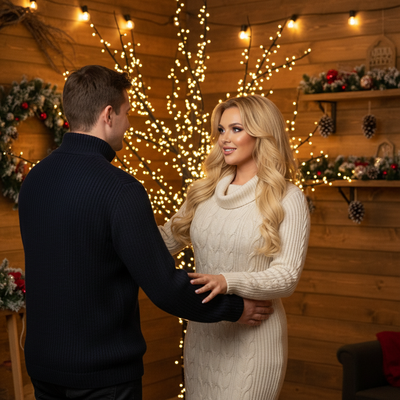
Create beautiful Christmas pictures with our Dancing in a Winter Wonderland style.
Immerse yourself in the enchanting style of Dancing in a Winter Wonderland, where the magic of Christmas comes alive through the lens of your camera. Imagine a photorealistic, cinematic moment where a simple slow dance near a glowing Christmas tree turns into a memory captured forever. Thanks to the innovation of AI Christmas Photo Studio, creating these warm, nostalgic scenes from your own holiday photos has never been easier. Perfect for transforming your Christmas pictures into lasting moments, this style combines the charm of cinematic photography with the heartwarming essence of winter celebrations.
Capture the Magic with AI Christmas Photo Studio
With the power of AI Christmas Photo Studio, your cherished holiday moments are elevated into unforgettable Christmas photos that feel like scenes from a beloved Christmas film. The AI engine adapts your uploaded images, placing one or two beloved faces dancing near a beautifully lit tree. To make sure everyone is part of the joy, any additional friends or family in the uploaded images are cheerfully positioned at the edges, adding to the festive ambiance. This allows for Christmas pictures that are not only beautifully composed, but also capture the warmth and togetherness of the season.
Create Cinematic Christmas Pictures Indoors
Imagine the cozy ambiance of an indoor lodge, where wooden walls are adorned with glittering lights and ornaments that sparkle like stars against the night sky. This is where the true spirit of the holidays can be captured in your Christmas photos. The AI Christmas Photo Studio sets the scene with a warm tungsten glow and soft fills, keeping each frame ready for motion-friendly captures of your cherished moments. Whether you're planning to use these images as a Christmas wallpaper or simply to cherish for years to come, the ambiance created is picturesque and magical.
Dress to Impress: Wardrobe & Style Tips
When considering wardrobe for your Christmas pictures in this style, think casual elegance with a touch of holiday charm. Red, cream, and navy are the perfect tones for winter dresses or sweaters, complementing the cozy lodge setting. This color palette amplifies the romantic, nostalgic mood and ensures your Christmas photos are filled with classic holiday cheer. Let your attire reflect the beauty and simplicity of the season, adding to the overall aesthetic of the scene, whether it becomes an unforgettable Christmas card or a cherished addition to your photo collection.
Lighting the Path to Memorable Christmas Photos
Lighting is crucial in transforming ordinary photos into extraordinary pieces of Christmas art. In this style, warm tungsten string lights paired with a soft fill cast a gentle glow that evokes warmth and comfort. The AI Christmas Photo Studio keeps the lighting balanced, providing a soft yet stunning illumination that highlights every emotion on display. This thoughtful setup creates a timeless ambiance perfect for slow-dancing memories or candid snapshots that may find their way into your favorite Christmas wallpaper.
From Memories to Keepsakes: The Perfect Christmas Card
What better way to share the joy of your holiday season than with a breathtaking Christmas card? Using the Dancing in a Winter Wonderland style, your Christmas photos can become a personal greeting that speaks volumes. Whether it's the warmth of a family dance captured mid-sway or the joy in the eyes of onlookers, each photo embodies the spirit of Christmas. Let AI Christmas Photo Studio help you create a card that shares the cherished essence of love and memory.
What makes this style different from other Christmas photo styles?
Most Christmas photo styles rely on a posed group standing in front of a tree or fireplace. Dancing in a Winter Wonderland instead builds a moving, cinematic moment: a slow dance mid-sway, framed by warm tungsten light and a glowing tree in the background. The result feels closer to a still from a holiday film than a typical portrait.
What photo should you upload for the best result?
A clear, well-lit photo showing the face and upper body works best, ideally with the subject looking toward the camera. For this style, a photo of one or two people produces the most natural dance pose, since PiXmas positions the main subjects close together at the center of the scene. Extra people in the source photo are placed at the edges of the frame rather than in the dance itself.
Who is this Christmas photo style best for?
This style is especially suited to couples and spouses who want a romantic keepsake, engaged pairs planning holiday announcements, or parents recreating a nostalgic slow-dance moment together. Families can use it too, though the composition centers on one or two dancers, so it reads best as a couple-focused Christmas picture rather than a full group portrait.
How does PiXmas compare to a photographer or DIY setup?
- Photography educators using Google Trends report that searches for terms like “Christmas card photos” remain fairly constant through much of the year, then trend upward from September or October and spike in December. (Tech Photo Guy – Google Trends for Photographers, 2018)
- Google’s Holiday Trends reports that many Christmas‑related queries in the US, including decorating and baking topics, spike each December, illustrating that demand for Christmas imagery and content concentrates late in the year. (Google – Holiday Trends (Year in Search 2025), 2025)
- A general guide to using Google Trends recommends setting multi‑year ranges to spot seasonality, noting that Christmas‑related terms consistently show seasonal spikes that can guide when to publish holiday photo content. (Cemoh – How to Use Google Trends: A Complete Guide, 2026)
Limitations
Dancing in a Winter Wonderland images are AI-generated stylized pictures, not photographs from an actual lodge shoot or real tree setup. Details like wardrobe texture, exact lighting, or facial likeness can vary between generations. Photos with several faces may render less consistently than a solo or couple photo, since the AI has to balance more detail across the frame. This style is one of PiXmas's 800+ available looks, and results are meant as a fun, shareable keepsake rather than a substitute for a professional print.
For a romantic, film-like Christmas picture built from a single phone photo, Dancing in a Winter Wonderland is a strong PiXmas pick for couples and families wanting a cinematic keepsake without a real photo shoot.
Frequently asked questions
What is the Dancing in a Winter Wonderland Christmas photo style?
It is a PiXmas style that turns an uploaded photo into a cinematic slow-dance scene near a glowing Christmas tree, set inside a cozy lodge with warm tungsten lighting and a red, cream, and navy wardrobe palette.
Can I use a photo with more than two people?
Yes, but the dance pose is built around one or two main subjects, so any additional people from your uploaded photo are placed at the edges of the scene rather than dancing themselves.
Can I include pets in this photo style?
This style focuses on a slow-dance moment between people, so it is not designed for pets. PiXmas offers other Christmas styles better suited to featuring a pet as the main subject.
Do I need a professional photo to get good results?
No professional photo is required. A clear, well-lit photo taken on a phone, with the face visible, gives PiXmas enough detail to generate a polished Dancing in a Winter Wonderland picture.
Can I turn this style into a printed Christmas card?
Yes, once your image is generated in the PiXmas app you can save it and use it to create a printed or digital Christmas card through your preferred printing service.