Calendar Edition – The Minimalist Wall Layout Christmas Photo
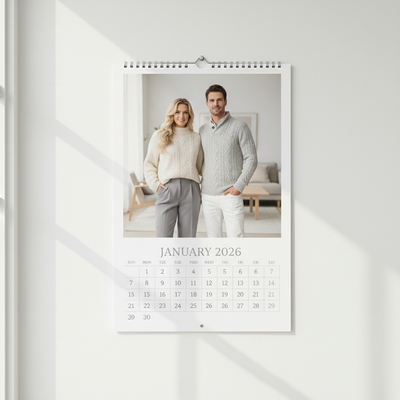
Quick answer: Calendar Edition – The Minimalist Wall Layout is an AI Christmas photo style that places your portrait inside a clean 2026 wall calendar design, set against a bright white or neutral interior with soft daylight and cream or grey knitwear. PiXmas generates it from one uploaded phone photo through its iOS app, giving a Scandinavian-inspired, gallery-style keepsake for cards, gifts, or wall art.
Imagine capturing your cherished moments with a touch of serene elegance this holiday season, the Calendar Edition – The Minimalist Wall Layout style transforms your memories into calm, timeless Christmas Photos. Envision your loved ones featured in a photorealistic cinematic RAW portrait, woven into a minimalist 2026 wall calendar design. Each image acts as a gateway to fond memories, set against a bright modern interior that breathes life into every pixel. Soft shadows fall across a pristine white background, creating a scene steeped in Scandinavian calm. With cozy knitwear in soft neutral tones like white, cream, or light grey, this style tells a quiet story of elegance and simplicity, accentuated by natural daylight illuminating every joyful smile.
Why Choose The Minimalist Wall Layout?
The beauty of the Minimalist Wall Layout lies in its ability to showcase your most treasured Christmas Pictures with sophistication. It is an ideal choice for those who love simplicity without giving up elegance. By featuring individual or couple portraits as the centerpiece of a minimalist calendar, each photo becomes more than an image; it becomes a piece of December art. For families or larger groups, the clean aesthetic helps every face stay visible and cherished. This AI Christmas Photo Studio creation lets your Christmas Card feel warm and genuine, appealing to anyone who admires understated design. The mix of cinematic clarity and modern minimalism brings past, present, and future together in one frame, making your Christmas Wallpaper a daily reminder of holiday joy.
Perfect For These Occasions
Whether you're looking to surprise your loved ones with a heartfelt Christmas Card or bring calm, evocative Christmas Wallpaper into your living space, the Calendar Edition suits every cherished moment. This style works well for personal gifts, social media shares, or home decoration. It shines during intimate family gatherings, Christmas Eve dinners, and cozy mornings by the fireplace. Since the serene Scandinavian-inspired setup pairs naturally with festive joy, your Christmas Pictures carry a sense of purity and affection that captures the holiday spirit. The versatility of this layout suits more than holiday memories too, it can mark any occasion with lasting elegance, becoming part of your family's story and a keepsake for years to come.
How to Create Your Calendar Edition – The Minimalist Wall Layout
Creating your personal Calendar Edition is simple with our AI Christmas Photo Studio. Start by choosing your favorite photo, whether it's a solo shot with a candid expression or one that captures familial warmth, and the system adapts to it. Uploading one or two photos places them as the primary focal point of the minimalist calendar, while a set of images can be arranged into a small gallery of memories. The AI adjusts lighting to echo the soft brilliance of natural daylight, and with a few simple steps your Christmas Photos are ready to display anywhere. It's a straightforward way to bring personal artistry and clean design together for the season.
Embrace the calm of minimalist design this Christmas with the Calendar Edition – The Minimalist Wall Layout, a way to keep your memories in clear, cinematic focus with a soothing Scandinavian feel.
What makes this style different from other Christmas photo styles?
Most Christmas photo styles lean on festive clutter, string lights, or busy holiday scenes. The Minimalist Wall Layout does the opposite, using a clean white or neutral interior, soft daylight, and a 2026 wall calendar frame instead of ornaments or props. The result reads more like a piece of home decor than a typical holiday snapshot, which is why it suits year-round display rather than only the tree or fireplace backdrop common to other themes.
What photo should you upload for the best result?
A single clear photo works best, ideally a solo portrait or a couple shot taken in even, natural light with the face unobstructed. Avoid heavy shadows, sunglasses, hats that cover the eyes, or busy backgrounds, since the AI uses your uploaded photo as the reference for expression and likeness. A front-facing or slight three-quarter angle photo tends to translate most naturally into the calm, symmetrical calendar layout.
Who is this Christmas photo style best for?
This layout suits people who want a quiet, design-forward keepsake rather than a loud holiday scene, think solo portraits for a personal gift, couples wanting a shared calendar print, or small families who like an uncluttered, gallery-style look. It is a strong fit for anyone furnishing a modern or Scandinavian-styled home, or for gifting a calendar that still looks good on the wall in July.
How does PiXmas compare to a photographer or DIY setup?
- Google’s Holiday Trends reports that many Christmas‑related queries in the US, including decorating and baking topics, spike each December, illustrating that demand for Christmas imagery and content concentrates late in the year. (Google – Holiday Trends (Year in Search 2025), 2025)
- Photography educators using Google Trends report that searches for terms like “Christmas card photos” remain fairly constant through much of the year, then trend upward from September or October and spike in December. (Tech Photo Guy – Google Trends for Photographers, 2018)
- A general guide to using Google Trends recommends setting multi‑year ranges to spot seasonality, noting that Christmas‑related terms consistently show seasonal spikes that can guide when to publish holiday photo content. (Cemoh – How to Use Google Trends: A Complete Guide, 2026)
Limitations
Results from PiXmas are AI-generated stylized images, not physical photos from a real calendar shoot or printed product. Details like text, calendar grid alignment, or fine background elements can vary slightly between generations. Photos with multiple people or several faces close together may render with a bit less consistency than a solo or couple portrait, so a single clean source photo generally gives the most reliable outcome for this minimalist layout.
For anyone who wants a calm, gallery-worthy Christmas keepsake instead of a busy holiday scene, PiXmas turns one uploaded photo into a minimalist 2026 wall calendar portrait with soft daylight and neutral knitwear, all from the iOS app in a few minutes.
Frequently asked questions
What is the Calendar Edition – The Minimalist Wall Layout style?
It is a Christmas photo style that places your portrait inside a clean 2026 wall calendar design, set against a bright white or neutral background with soft natural light and cream or grey knitwear, giving a Scandinavian-inspired, minimal look instead of a typical festive scene.
Do I get a physical printed calendar or just a digital image?
PiXmas generates a digital image styled to look like a wall calendar page. It is not a printed physical calendar, but the finished picture can be printed at home, sent to a print shop, or used as a digital Christmas card or wallpaper.
Can I include my pet in this Christmas photo style?
You can upload a photo that includes a pet, though this minimalist layout is designed primarily around solo or couple portraits. For a pet-focused result, a photo where the pet is clearly visible alongside you tends to work better than a distant or cropped shot.
What kind of source photo works best for the calendar look?
A single, well-lit photo with your face clearly visible works best. Even natural lighting, a neutral or plain background, and a relaxed expression help PiXmas produce a calendar image that matches the calm, minimal aesthetic of this style.
Can I turn a group family photo into this calendar style?
Yes, though this layout is built around clean, uncluttered composition, so smaller groups render more predictably than large families. PiXmas can still generate a group version, but a solo or couple photo typically produces the most consistent minimalist result.
Do I need design skills to create this format myself?
No design experience is needed. PiXmas handles the calendar layout, lighting adjustment, and background styling automatically once you upload one photo, so the finished Christmas picture is ready to save or share without any manual editing.