Calendar Edition – The Classic Desk Moment Christmas Photo
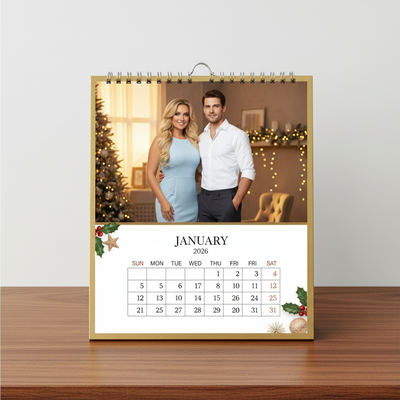
Quick answer: Calendar Edition – The Classic Desk Moment is a PiXmas AI Christmas photo style that turns one uploaded photo into a photorealistic desk calendar portrait for January 2026, set against golden soft indoor lighting with business casual or evening attire. Available through the PiXmas iOS app, it produces a polished, professional-looking Christmas picture suited for cards, wallpapers, or thoughtful gifting.
The holiday season brings with it the warmth of cherished moments and a sense of timeless elegance. This year, bring that charm to your Christmas with our Calendar Edition – The Classic Desk Moment, an AI-generated Christmas Photo Studio style that transforms your snapshots into beautifully crafted cinematic portraits. With a sophisticated desk calendar layout for January 2026, this style is well suited to creating unique and professional Christmas Pictures that truly resonate.
Why Choose This Style?
The Calendar Edition – The Classic Desk Moment combines elegance with a cherished holiday ambiance, perfect for those who appreciate both sophistication and sentimental warmth. Imagine a photorealistic RAW portrait meticulously adapted from your photo and beautifully framed within an elegant desk calendar design. It's more than a picture; it's a statement of your style and affection. The golden, soft indoor lighting, along with the timeless professionalism conveyed through business casual or evening attire, creates an enduring image that captures the essence of Christmas refinement.
Perfect For These Occasions
Whether you are gifting a loved one or sending out Christmas Cards with a personal touch, this style finds its charm and utility in each gesture. Small family gatherings, corporate festive gifts, or even capturing a standout moment for your own Christmas Wallpaper, it's a versatile style suited for any setting. With its ability to include multiple people, it offers a personal flair that highlights the bonds of friendship and family with captivating grace.
How to Create Your Calendar Edition
Getting started with your Calendar Edition – The Classic Desk Moment is remarkably simple. Upload one, two, or even several photos to our specialized AI Christmas Photo Studio. The system crafts a stunning portrait, placing your image into a distinctive desk calendar setting. You'll see your memories rendered with an elegant holiday appearance, blending AI technology with the warm tones and rich textures reminiscent of professional photography.
Experience the Magic
In a world full of fleeting moments, preserve the ones that matter most in a visually striking way. Let this holiday season be captured with the ease of modern technology and a touch of artistic charm. Create a Calendar Edition – The Classic Desk Moment that feels both personal and professional, ready for appreciation every day of the month.
What photo should you upload for the best result?
Choose one clear, well-lit photo where the face is unobstructed and looking roughly toward the camera. Front-facing shots with even lighting translate best into the desk calendar's photorealistic RAW portrait look. This style works well for a solo portrait or a couple photo, since the business casual and evening attire renders most convincingly when facial detail is sharp in the original image.
Who is this desk calendar style best for?
This style suits anyone who wants a Christmas picture with a polished, professional edge rather than a purely playful holiday scene. It works nicely for remote workers and office gift exchanges, couples wanting an elegant joint portrait, or family members creating a refined keepsake for a home office or desk display. It's also a fitting choice for corporate holiday cards where a more sophisticated tone is preferred over a casual snapshot.
How does PiXmas compare to a photographer or DIY setup?
- Photography educators using Google Trends report that searches for terms like “Christmas card photos” remain fairly constant through much of the year, then trend upward from September or October and spike in December. (Tech Photo Guy – Google Trends for Photographers, 2018)
- A general guide to using Google Trends recommends setting multi‑year ranges to spot seasonality, noting that Christmas‑related terms consistently show seasonal spikes that can guide when to publish holiday photo content. (Cemoh – How to Use Google Trends: A Complete Guide, 2026)
- Google’s Holiday Trends reports that many Christmas‑related queries in the US, including decorating and baking topics, spike each December, illustrating that demand for Christmas imagery and content concentrates late in the year. (Google – Holiday Trends (Year in Search 2025), 2025)
Limitations
Results from PiXmas are AI-generated stylized images, not physical photos taken with a calendar prop or desk set. Fine details like text on a real calendar, background objects, or specific attire textures may vary slightly from the original photo. Uploads with several faces at once may render with less consistency than a solo or couple photo, so a clear individual or pair shot generally gives the most reliable outcome.
For a Christmas picture that leans professional and sentimental at once, PiXmas offers a quick way to see this desk calendar concept applied to your own photo before deciding on prints or cards.
Calendar Edition – The Classic Desk Moment is a strong pick for anyone wanting a Christmas picture that feels professional and sentimental at once, and PiXmas makes it simple to generate from a single phone photo without a studio shoot.
Frequently asked questions
What is the Calendar Edition – The Classic Desk Moment style?
It is an AI Christmas photo style from PiXmas that places your portrait inside a desk calendar design for January 2026, using photorealistic rendering, golden soft indoor lighting, and business casual or evening attire for a refined, professional holiday look.
Can I use this style for a printed Christmas card?
Yes. The finished portrait is a high-resolution image well suited to printing as a Christmas card, desk display, or digital wallpaper, since the desk calendar composition is designed to look polished at both screen and print size.
Can I include more than one person in the photo?
Yes, you can upload photos with multiple people for a shared desk calendar portrait. Solo and couple photos tend to render most consistently, while group photos with several faces may show a bit more variation.
Do I need a professional photo to get good results?
No professional photo is required. A clear, well-lit phone photo with an unobstructed face is enough for PiXmas to generate the Calendar Edition portrait with accurate detail.
How long does it take to generate this style?
Generating the Calendar Edition – The Classic Desk Moment typically takes just a few minutes in the PiXmas app after you upload your photo, far faster than scheduling and completing a traditional photo shoot.
Will the calendar dates or text be accurate?
The calendar layout is a stylized design element rather than a functioning printed calendar, so exact dates or text should be treated as decorative rather than a precise, editable calendar template.