Calendar Edition – Seasonal Reflection Christmas Photo
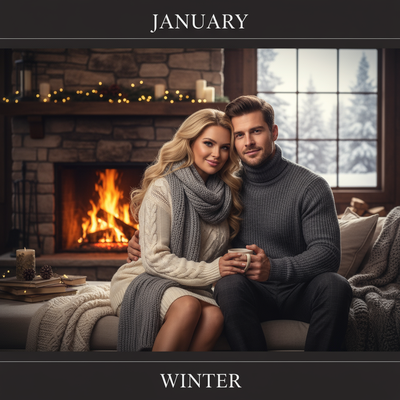
Quick answer: Calendar Edition – Seasonal Reflection is an AI Christmas photo style from PiXmas that turns one uploaded photo into a cinematic winter portrait set against snow-veiled vistas or a fireside glow, styled with wool sweaters and soft warm light. Built for a personalized Christmas calendar, card, or wallpaper, it's created in the PiXmas iOS app from a single photo, part of a library of 800+ styles.
Welcome to the world of the Calendar Edition – Seasonal Reflection, where the crisp, serene beauty of winter transforms your cherished memories into elegant Christmas keepsakes. This photo style blends photorealistic cinematic RAW portraits with the cozy warmth of a winter setting. With a curated mix of snow-veiled vistas or the gentle glow of a fireplace backdrop, it captures the tender, reflective moments of the season in fine detail. Dressed in wool sweaters and winter neutrals, your subjects are enveloped in a warm, soft light that evokes emotional warmth and serenity.
Why Choose This Style?
The Calendar Edition – Seasonal Reflection is not merely a photograph; it's a gateway to reliving moments of winter magic. It captures the sense of togetherness and reflection the holiday season uniquely brings. When one or two people are photographed, this style turns them into the focus of a cinematic portrait fit for a seasonal calendar, taking each month on a journey through winter with a January–Winter theme. Our AI Christmas Photo Studio renders these moments with careful detail, offering a stunning representation of your holiday memories, ideal for Christmas Pictures or a Christmas Card.
Perfect For These Occasions
Imagine gifting friends and family a beautifully crafted seasonal calendar where each month shares a magical moment from the winter season. Whether it's a cozy indoor gathering by the fireside or a serene moment in a snowy landscape, this style is well suited to turning those experiences into lasting keepsakes. It's ideal for couples or families wishing to send a personalized Christmas Card or decorate their homes with elegant Christmas Wallpaper that doubles as art. The AI Christmas Photo Studio aims to make every image, whether an intimate couple scene or a family portrait, feel polished and memorable.
How to Create Your Calendar Edition – Seasonal Reflection
Creating your own Seasonal Reflection image starts with uploading your favorite photo to our AI Christmas Photo Studio. The system adapts the layout to feature either an individual portrait against a serene snow-view background or a group setting in a cozy indoor ambiance. The soft lighting and curated wardrobe suggestions, like wool sweaters and scarves, help build the warm, reflective palette this style is known for.
Capture the heart of winter with the Calendar Edition – Seasonal Reflection and let every glance recall the warmth of the Christmas season, in a keepsake you can revisit long after the holidays end.
What makes this style different from other Christmas photo styles?
Calendar Edition – Seasonal Reflection pairs a cinematic RAW portrait look with a calendar-ready structure built around a January–Winter theme rather than a single festive scene. Instead of Santa hats or ugly-sweater novelty, it leans on snow-veiled vistas or a fireside glow paired with wool sweaters and winter neutrals, giving the image a quieter, more reflective mood than typical holiday photo styles.
What photo should you upload for the best result?
A clear, front-facing photo with good lighting and an unobstructed face gives the AI the most to work with. Solo portraits and couple photos tend to translate best into this style, since the composition is built around one or two people as the focal point of the scene. A plain or simple background in the source photo also helps the system separate the subject from the winter setting it generates.
Who is this Christmas photo style best for?
This style suits couples and individuals who want a reflective, calendar-style keepsake rather than a busy group scene. It works well for anyone building a 12-month gift calendar, a quiet-toned Christmas card, or a wallpaper that feels more like art than a snapshot. Larger family groups can still try it, though the cinematic single or dual portrait framing is where it shines most.
How does PiXmas compare to a photographer or DIY setup?
- Google’s Holiday Trends reports that many Christmas‑related queries in the US, including decorating and baking topics, spike each December, illustrating that demand for Christmas imagery and content concentrates late in the year. (Google – Holiday Trends (Year in Search 2025), 2025)
- A general guide to using Google Trends recommends setting multi‑year ranges to spot seasonality, noting that Christmas‑related terms consistently show seasonal spikes that can guide when to publish holiday photo content. (Cemoh – How to Use Google Trends: A Complete Guide, 2026)
- Photography educators using Google Trends report that searches for terms like “Christmas card photos” remain fairly constant through much of the year, then trend upward from September or October and spike in December. (Tech Photo Guy – Google Trends for Photographers, 2018)
Limitations
Results from PiXmas are AI-generated stylized images, not physical photos taken at a real winter location or photography set. The snow-veiled vistas and fireplace backdrop are illustrative recreations, not actual settings. Photos with several faces may render with somewhat less consistency than solo or couple uploads, and final detail depends on the clarity of the original photo.
For a quiet, cinematic take on a Christmas calendar or card, Calendar Edition – Seasonal Reflection turns a single well-lit photo into a polished winter portrait through the PiXmas app, best suited to solo and couple images rather than large groups.
Frequently asked questions
What is the Calendar Edition – Seasonal Reflection style?
It's a Christmas photo style that reimagines your photo as a cinematic winter portrait, set against snow-veiled vistas or a fireside glow, with wool-sweater wardrobe and soft warm light, built around a January–Winter calendar theme.
Can I turn this into a printed calendar or Christmas card?
Yes. Once your PiXmas image is generated, you can download it and use it to print a personal calendar, greeting card, or framed keepsake outside the app.
Can I include my pet in the photo?
Yes, a pet can appear alongside you in the fireside or snowy scene. Results are generally most consistent when the source photo clearly shows one or two main subjects.
What kind of source photo works best?
Upload a well-lit, front-facing photo with your face clearly visible. Solo or couple photos give PiXmas the clearest starting point for this cinematic winter style.
How many people can be in one photo for this style?
This style is designed around one or two people as the focal point. Larger groups can be used, though the composition works best with a smaller number of subjects.