Calendar Edition – Modern Lifestyle Spread Christmas Photo
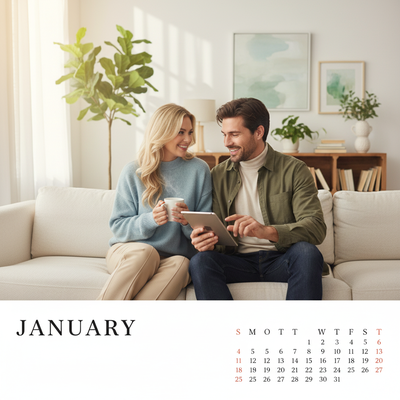
Quick answer: The Calendar Edition – Modern Lifestyle Spread is a PiXmas AI Christmas photo style that turns a single uploaded photo into a bright, softly lit lifestyle portrait with pastel tones, minimal knitwear, and a cozy modern home backdrop. It suits calendar pages, holiday cards, or wallpaper, and works for solo, couple, or small group photos processed through the PiXmas iOS app.
Imagine a world where your cherished Christmas memories are not only captured but elegantly preserved. Enter the Calendar Edition – Modern Lifestyle Spread, a style that blends traditional photo warmth with the polish of a modern lifestyle spread. It turns your photo into a lifelike portrait reminiscent of a cinematic scene inside a cozy home near the holidays. Perfect for a wall-mounted calendar or a holiday card, this style captures subtle, everyday elegance and turns your Christmas pictures into keepsakes.
Why Choose This Style?
The Calendar Edition – Modern Lifestyle Spread is more than a photographic style; it's an atmosphere. A bright yet soft home interior, paired with understated casual modern wardrobe choices like turtlenecks and minimal knits, captures the feel of everyday luxury. Cinematic pastel tones and natural daylight lighting give each photograph a relatable, editorial quality, turning an ordinary Christmas photo into something closer to a lifestyle magazine spread. The underlying AI adapts to your uploaded photo so the result stays personal rather than generic.
Perfect For These Occasions
This style suits the moments when family and friends come together, making it a strong choice for Christmas card imagery. Whether it's an intimate photo of you and a loved one or a small group shot with natural interaction, the Calendar Edition gives you a clean, elegant canvas. It works for family gatherings, quiet holiday mornings, or even a solo portrait. Use it as Christmas wallpaper or as the January page of a home calendar.
How to Create Your Calendar Edition
Creating your Calendar Edition portrait starts with uploading a photo into the PiXmas app. The style adapts to the details in your photo, arranging lighting, wardrobe, and setting to build a cinematic, RAW-style portrait. A solo figure becomes a relaxed lifestyle 'January' centerpiece, while a small group is composed with natural, believable interaction.
The result trades a full DIY photoshoot for a few minutes in the app, so you can spend the season enjoying it rather than staging it. Let this Christmas be the one where your photos read as intentional and cinematic instead of just casual snapshots.
What photo should you upload for the best result?
Start with a clear, well-lit photo where the face is fully visible and not obscured by sunglasses, heavy shadow, or a hat. Front-facing or slightly angled shots work better than extreme profiles because the style needs to read facial detail clearly under soft daylight tones. A higher-resolution phone photo, even a casual one, gives the AI more to work with than a blurry or heavily cropped image.
For couples or small groups, a photo where everyone is visible and reasonably close together tends to translate more smoothly into the finished lifestyle scene. You do not need a professional photo. A single recent phone photo is usually enough to generate the Calendar Edition look.
Who is this Christmas photo style best for?
This style fits people who want a calendar or card image that feels like a modern lifestyle magazine rather than a traditional festive photo. It works well for couples wanting an understated joint portrait, small families who want a cleaner alternative to matching pajama photos, and individuals who want a January calendar page that still feels personal. Because the palette is soft and pastel rather than heavily themed, it also suits anyone who wants a Christmas photo that can double as year-round wall art.
How does PiXmas compare to a photographer or DIY setup?
- Google’s Holiday Trends reports that many Christmas‑related queries in the US, including decorating and baking topics, spike each December, illustrating that demand for Christmas imagery and content concentrates late in the year. (Google – Holiday Trends (Year in Search 2025), 2025)
- Photography educators using Google Trends report that searches for terms like “Christmas card photos” remain fairly constant through much of the year, then trend upward from September or October and spike in December. (Tech Photo Guy – Google Trends for Photographers, 2018)
- A general guide to using Google Trends recommends setting multi‑year ranges to spot seasonality, noting that Christmas‑related terms consistently show seasonal spikes that can guide when to publish holiday photo content. (Cemoh – How to Use Google Trends: A Complete Guide, 2026)
PiXmas is a practical option when you want the modern lifestyle calendar look without booking a session or setting up a home shoot yourself.
Limitations
The Calendar Edition – Modern Lifestyle Spread is an AI-generated stylized image, not a physical photo from a real studio or home set, so the interior, lighting, and wardrobe are recreated rather than actually photographed. Results can vary between uploads, and photos with several faces in one frame may come out slightly less consistent than a solo or couple photo. Fine details like text, jewelry, or patterned fabric can occasionally look slightly off, and outcomes depend on the clarity of the original photo you upload.
For anyone wanting a calendar-worthy Christmas photo with a modern, editorial feel rather than a traditional festive look, PiXmas turns one everyday photo into the Calendar Edition – Modern Lifestyle Spread in minutes, without a studio session or DIY setup.
Frequently asked questions
What is the Calendar Edition – Modern Lifestyle Spread style?
It is a Christmas photo style built around soft daylight, pastel tones, and understated modern wardrobe like turtlenecks and knitwear, styled to look like a lifestyle magazine spread inside a cozy home. It suits calendars, holiday cards, and wallpapers.
What kind of photo works best for this style?
A clear, well-lit phone photo with the face fully visible works best. PiXmas uses that single photo to build the scene, so avoid heavy shadows, sunglasses, or extreme crops for the most accurate result.
Can I include a pet in the Calendar Edition photo?
You can upload a photo that includes a pet, and it may appear in the generated scene, though the style is optimized primarily for people. Results with pets can be less predictable than solo or couple portraits.
Can I use this style for a printed calendar or Christmas card?
Yes, the Calendar Edition is designed with printed use in mind, including wall calendars and holiday cards, since the pastel tones and clean composition translate well to print as well as digital display.
How many people can be in one uploaded photo?
You can upload a solo photo, a couple, or a small group. PiXmas processes the group together, though very large groups may render with slightly less consistency than a solo or couple photo.