Calendar Edition – Golden Hour Frame Christmas Photo
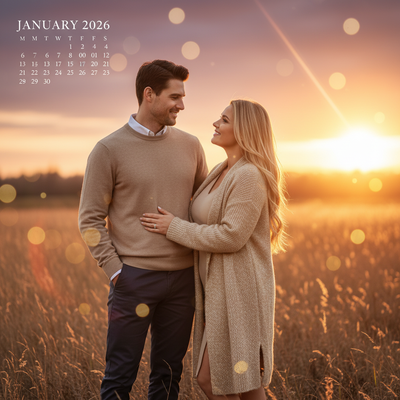
Quick answer: Calendar Edition – Golden Hour Frame is a PiXmas AI Christmas photo style that turns one uploaded photo into a photorealistic, cinematic portrait bathed in golden-hour light, styled like a January calendar page. Made in the PiXmas iOS app from a single photo, it suits solo portraits, couples, or families dressed in beige, rust, or gold tones for a warm, nostalgic keepsake.
Embrace the warmth and timeless beauty of the Calendar Edition – Golden Hour Frame this Christmas season. Imagine a photorealistic, cinematic RAW portrait that captures the essence of you and your loved ones under a golden sunset sky. Whether you're featuring one or two individuals, or gathering multiple family members together, this style perfectly frames your cherished Christmas moments as if they belong on a stunning January 2026 calendar page. With hues of beige, rust, and gold wrapping you in a warm bokeh embrace, this scene isn't just a photo, it's a heartfelt story told through the lens of an AI Christmas Photo Studio.
Why Choose This Style?
The Golden Hour Frame is more than just a picture; it's an experience etched in nostalgia and sentimentality. Leveraging AI technology, this style adapts to your uploaded photo, ensuring each shot is as unique and personal as a handwritten Christmas card. The cinematic glow of the golden sunset adds a touch of magic and warmth, making these Christmas pictures visually captivating and emotionally fulfilling. Each photo is transformed into a keepsake that evokes the warmth of togetherness and the cozy feelings of the holiday season.
Perfect For These Occasions
This evocative Calendar Edition style shines brightest during those cherished holiday moments. Use it to create unforgettable Christmas cards that resonate with your friends and family, complete with a touch of golden-hour magic. Ideal for family gatherings or intimate sessions, the timeless appeal of this style works well for both small and large family portraits. These photos can turn into Christmas wallpapers for digital devices, or cherished gallery pieces throughout the home. Whenever you seek to capture the essence of love, warmth, and cherished memories, this style brings your vision to life in ways that last beyond the holidays.
How to Create Your Golden Hour Frame
Crafting your Golden Hour Frame is effortless thanks to the power and precision of an AI Christmas Photo Studio. Begin by selecting your favorite photo, whether it's a solo shot or a joyous family scene. Choose attire in harmonious tones of beige, rust, or gold, which naturally complement the golden hour's palette. Upload your photo into the AI platform, and watch as it's transformed into a breathtaking cinematic frame. The AI ensures every element, from the nostalgic lighting to the heartfelt mood, is refined into a piece ready to adorn your walls or share as a Christmas card.
Ready to bring the golden hour magic to your Christmas memories? Step into the world of effortless creativity and explore the possibilities of the AI Christmas Photo Studio, crafting cinematic Christmas photos that shine with timeless beauty.
What photo should you upload for the best result?
Choose a clear, well-lit photo where the face is unobstructed by sunglasses, heavy shadows, or hats. A front-facing or slightly angled shot works better than a distant or blurry one, since the AI uses your features to build the golden-hour portrait. For a couple or family version, a photo where everyone is visible and reasonably close together gives the model more to work with.
Who is this golden hour style best for?
This style suits solo portraits meant for a personal calendar page, couples wanting a warm anniversary-style Christmas card, and families or siblings who want a shared cinematic keepsake. It also works nicely for extended family photos where everyone wants one cohesive, sunset-toned image instead of separate snapshots. Anyone drawn to a nostalgic, film-like glow rather than a bright studio look will find this frame a natural fit.
How does PiXmas compare to a photographer or DIY setup?
- A general guide to using Google Trends recommends setting multi‑year ranges to spot seasonality, noting that Christmas‑related terms consistently show seasonal spikes that can guide when to publish holiday photo content. (Cemoh – How to Use Google Trends: A Complete Guide, 2026)
- Google’s Holiday Trends reports that many Christmas‑related queries in the US, including decorating and baking topics, spike each December, illustrating that demand for Christmas imagery and content concentrates late in the year. (Google – Holiday Trends (Year in Search 2025), 2025)
- Photography educators using Google Trends report that searches for terms like “Christmas card photos” remain fairly constant through much of the year, then trend upward from September or October and spike in December. (Tech Photo Guy – Google Trends for Photographers, 2018)
Limitations
Results from PiXmas are AI-generated stylized images, not physical photographs from a real golden-hour shoot. The app reimagines your uploaded photo rather than capturing a new one in real light. Photos with several faces or family groups may render slightly less consistently than a solo or couple portrait, since more detail has to be interpreted at once. Lighting, skin tones, and fine details are AI approximations rather than exact reproductions of a source photo.
For anyone who wants a warm, cinematic calendar-style Christmas portrait without booking a golden-hour photoshoot, PiXmas turns a single uploaded photo into a polished, sunset-toned keepsake in minutes.
Frequently asked questions
What is the Calendar Edition Golden Hour Frame style?
It's an AI Christmas photo style that turns your uploaded photo into a photorealistic portrait bathed in golden sunset light, styled to look like a January calendar page with warm beige, rust, and gold tones and soft bokeh.
Can I use a group family photo for this style?
Yes, PiXmas can generate a Golden Hour Frame from a family photo with multiple people, though results with several faces may be slightly less consistent than a solo portrait or couple's photo.
Do I need a professional photo to get good results?
No, a clear phone photo with good lighting and a visible face works well. PiXmas is built around a one-photo workflow, so you don't need studio equipment or a professional shoot to get a golden-hour portrait.
Can I include a pet in the Golden Hour Frame photo?
If your uploaded photo includes a pet alongside you, PiXmas will attempt to render it within the golden-hour scene, though the style is primarily designed and tested for people.
Will the finished image look like a real photograph?
The Golden Hour Frame is designed to look photorealistic and cinematic, but it remains an AI-generated interpretation of your photo rather than an actual photograph taken at sunset.
What can I do with my finished Golden Hour Frame photo?
Many people use their PiXmas Golden Hour Frame image as a printed Christmas card, a digital calendar page, or a phone and desktop wallpaper for the holiday season.