Calendar Edition – Editorial Elegance Christmas Photo
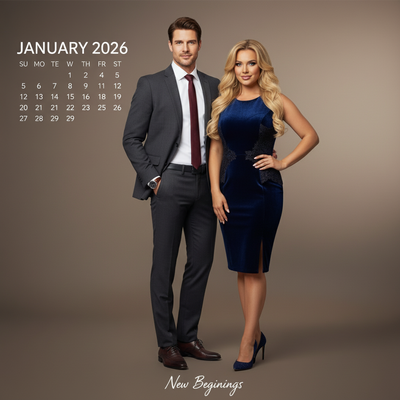
Quick answer: Calendar Edition – Editorial Elegance is a PiXmas Christmas photo style that turns one uploaded photo into a photorealistic, cinematic RAW portrait with studio key lighting, gradient backgrounds, and editorial posing. It suits solo portraits, couples, or small groups going for a polished calendar-cover look for cards, wall calendars, or holiday wallpaper. The iOS app processes the image in minutes, with no studio booking or wardrobe styling required.
Imagine a Christmas photo style that not only captures the joy of the season but improve it to a level of cinematic elegance. Welcome to the Calendar Edition – Editorial Elegance. This isn't just any Christmas photo; it's a sophisticated portrayal of your cherished moments, transformed into a piece worthy of a high-fashion calendar. With a photorealistic cinematic RAW portrait, this style adapts to your photo, creating an image perfect for the cover of a January 2026 calendar.
Why Choose This Style?
The Calendar Edition – Editorial Elegance transforms simple Christmas photos into high-art editorial imagery. Each image is crafted with studio portrait layouts that include subtle gradient backgrounds and modern type overlays, setting a sophisticated tone that stands out. Whether it's a solo portrait or a group shot, the polished editorial poses and high-fashion styling reflect a sense of luxury and timelessness. The cinematic shadows created by studio key lighting add depth and drama, making this style well suited to those who want their holiday memories rendered in a chic, polished manner.
Perfect For These Occasions
This style suits a range of occasions during the holiday season. It works well for elegant Christmas card displays, where an editorial-quality image adds a touch of sophistication. It's also a strong choice for a personalized Christmas calendar, particularly the January 2026 page, letting your holiday memories extend past the season. It also suits a holiday gala or formal event, capturing the moment as a lasting, polished keepsake.
How to Create Your Calendar Edition – Editorial Elegance
Creating your Calendar Edition photo is straightforward. Begin by selecting a favorite high-fashion or formal outfit, whether it's a striking dress, a tailored suit, or a stylish blazer. Upload one or two of your favorite Christmas pictures to our AI Christmas Photo Studio, or add more participants for a group portrait. The AI adapts to your photo, crafting a cinematic, editorial-style image with rich shadows and elegant composition. The result is a photorealistic image that keeps the likeness of the people in it while adding the finesse of an editorial spread.
AI simplifies the process and keeps each photo polished and professional, so you can enjoy the holiday season without organizing an actual studio shoot.
Closing - Embrace the Elegance of Editorial Christmas Imagery
As the holiday season approaches, capture your moments with an elegance that speaks for itself. Whether you're sending Christmas cards or making a Christmas wallpaper, the Calendar Edition – Editorial Elegance offers a stylish, luxurious option worth trying this year.
What photo should you upload for the best result?
Start with one clear, well-lit photo where the face is fully visible and not obscured by hats, sunglasses, or heavy shadows. A front-facing or slight-angle shot works better than a distant or side profile for this style.
Solo and couple photos tend to render the most consistent editorial detail. If you want a group calendar cover, choose a photo where everyone is clearly visible and similarly lit, since busy or dim source images give the AI less to work with.
How does PiXmas compare to a photographer or DIY setup?
- Google’s Holiday Trends reports that many Christmas‑related queries in the US, including decorating and baking topics, spike each December, illustrating that demand for Christmas imagery and content concentrates late in the year. (Google – Holiday Trends (Year in Search 2025), 2025)
- Photography educators using Google Trends report that searches for terms like “Christmas card photos” remain fairly constant through much of the year, then trend upward from September or October and spike in December. (Tech Photo Guy – Google Trends for Photographers, 2018)
- A general guide to using Google Trends recommends setting multi‑year ranges to spot seasonality, noting that Christmas‑related terms consistently show seasonal spikes that can guide when to publish holiday photo content. (Cemoh – How to Use Google Trends: A Complete Guide, 2026)
Limitations
The Calendar Edition – Editorial Elegance result is an AI-generated stylized image, not a physical photo from a real studio session, so it should be treated as digital art rather than a traditional print proof.
Photos with several faces or a crowded group may render with slightly less consistency than a solo portrait or couple shot, since the AI has more detail to interpret at once. Final results also depend on the clarity and lighting of the photo you upload. For best results with cards or calendars, review the image on a larger screen before ordering prints, since PiXmas output is a digital file you export rather than a physical product itself.
For anyone wanting a high-fashion, calendar-worthy Christmas portrait without booking a studio, PiXmas turns a single photo into a polished editorial image in minutes, making it a fitting choice for elegant cards, personalized calendars, or holiday wallpaper.
Frequently asked questions
What is the Calendar Edition – Editorial Elegance style?
It is a Christmas photo style that reimagines your portrait as a photorealistic, cinematic editorial image, with studio key lighting, gradient backgrounds, and high-fashion posing similar to a calendar cover shoot.
Can I use a group or family photo for this style?
Yes. PiXmas can apply the editorial look to group photos, though solo or couple portraits typically render with more consistent detail. For a family calendar page, choose a photo where everyone is clearly lit and visible.
Do I need special wardrobe or makeup for this look?
No professional styling is required. Formal or tailored outfits like a blazer, dress, or suit photograph well in this editorial style, but the AI works with whatever you're already wearing in your uploaded photo.
Can I print the result as an actual calendar or Christmas card?
Yes, the finished image is a digital file you can export and send to a print service for cards, calendars, or framed prints. PiXmas creates the image; printing is handled separately through your preferred print provider.
What photo works best as the source image?
A clear, well-lit photo with your face fully visible works best. Avoid heavy shadows, sunglasses, or hats. Sharper, higher-resolution photos generally produce cleaner editorial detail than blurry or low-light shots.
How long does it take to get the finished image?
PiXmas processes the Calendar Edition – Editorial Elegance style in minutes inside the iOS app, so there is no need to schedule a shoot or wait days for a studio turnaround.