Christmas Angel Glow Christmas Pictures
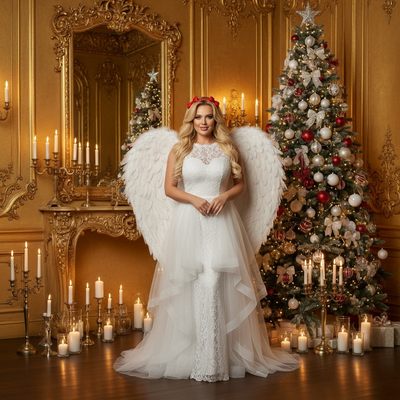
Quick answer: Christmas Angel Glow is an AI-stylized Christmas photo look that transforms an uploaded photo into a celestial angel portrait, set against a golden baroque room with candlelight and a red-and-white decorated tree. Created with the PiXmas app from a single uploaded photo, it works for solo portraits, couples, or families, and is delivered as a digital image suited for cards or wallpaper, not a printed studio photo.
Step into a world of elegance and whimsy this holiday season with our Christmas Angel Glow photo style. Capturing the ethereal glow of Christmas enchantment, this unique style of Christmas Pictures transforms your favorite festive moments into magical works of art. Perfectly tailored to the photo you upload, it paints a serene picture of Christmas wonder: imagine being adorned as a celestial angel amidst a backdrop of a luxurious golden baroque room. With soft candlelight hugging every corner, and a meticulously decorated tree boasting white and red ornaments, your Christmas memories are turned into a stunning, realistic, and divine scene.
Why Choose This Style?
The Christmas Angel Glow style is for those who cherish the elegance of the season and want an atmosphere of mystery and wonder in their Christmas pictures. This style lends a photorealistic angelic transformation, capturing the grace and charm of Christmas. Each photo is designed to reflect the inner warmth of the holidays, using subdued lighting and shadows to accentuate the serene expression and divine ambiance of your portrait. The AI Christmas Photo Studio technology is built to preserve facial detail, so the transformation feels both striking and true to you. Download the PiXmas app to get started.
Perfect For These Occasions
Whether you're crafting family Christmas cards or looking for a Christmas wallpaper, the Christmas Angel Glow style offers a distinct elegance and sophistication. It suits intimate family gatherings or personal holiday reflections, turning a photo into a keepsake that captures the spirit of togetherness and joy. Imagine sending a card where your family appears as if living inside a Christmas dream, an image cherished at home and admired by anyone who receives your card. This style also works well for a framed Christmas portrait meant to be displayed as a lasting keepsake.
How to Create Your Christmas Angel Glow
Creating your own Christmas Angel Glow image is simple. Start by visiting the AI Christmas Photo Studio and upload your chosen photo. For a single subject, watch them transition into a Christmas angel, complete with a delicate white lace gown, angel wings, and a red bow. For group photos, the AI integrates each person into the same scene, aiming to preserve lighting, mood, and facial likeness so everyone appears naturally within the decorated setting. The gentle candlelight gives a soft glow, with shadows that add to the quiet, elegant mood of the portrait.
Ready to turn a holiday photo into an angelic, candlelit scene? Visit the AI Christmas Photo Studio to start your Christmas Angel Glow portrait.
What photo should you upload for the best result?
A clear, well-lit photo where the face is fully visible works best for the Christmas Angel Glow style. Choose an image with the subject facing forward or at a slight angle, since the AI needs an unobstructed view to render the angelic transformation and preserve facial likeness. Avoid photos where sunglasses, hats, or heavy shadows cover the face, as these can reduce the accuracy of the final result. A single close-up or waist-up shot tends to translate more cleanly into the golden baroque scene than a wide, busy background photo.
Who is this Christmas photo style best for?
Christmas Angel Glow suits anyone drawn to a softer, more elegant take on holiday portraits rather than a playful or comedic one. Solo portraits work well for a personal keepsake or profile image, while couples can create a paired angelic look for a shared card. Families choosing this style often use it for a formal-feeling holiday card that leans reflective rather than festive-chaotic. It is less suited to action shots or large groups where every face needs equal, sharp detail, since the angelic wardrobe and lighting are built around a calmer, more intimate composition.
How does PiXmas compare to a photographer or DIY setup?
- Photography educators using Google Trends report that searches for terms like “Christmas card photos” remain fairly constant through much of the year, then trend upward from September or October and spike in December. (Tech Photo Guy – Google Trends for Photographers, 2018)
- A general guide to using Google Trends recommends setting multi‑year ranges to spot seasonality, noting that Christmas‑related terms consistently show seasonal spikes that can guide when to publish holiday photo content. (Cemoh – How to Use Google Trends: A Complete Guide, 2026)
- Google’s Holiday Trends reports that many Christmas‑related queries in the US, including decorating and baking topics, spike each December, illustrating that demand for Christmas imagery and content concentrates late in the year. (Google – Holiday Trends (Year in Search 2025), 2025)
Limitations
Christmas Angel Glow images are AI-generated stylized pictures, not physical photographs taken on a real set with actual props or wardrobe. Results are meant for digital use such as cards, wallpaper, or sharing online, not as a substitute for a professionally lit studio photograph. Photos with multiple faces, especially larger groups, may render with less consistency per person than a solo or couple portrait. Lighting, angle, and image quality of the original upload all affect how closely the final angelic scene matches expectations.
For anyone wanting an elegant, candlelit angel portrait without a real photo shoot, PiXmas turns a single uploaded photo into a Christmas Angel Glow image in minutes, making it a fitting choice for holiday cards or a personal keepsake.
Frequently asked questions
What is the Christmas Angel Glow style?
It is an AI Christmas photo style that turns an uploaded photo into an angelic portrait, complete with a white lace gown, angel wings, candlelight, and a golden baroque backdrop with a decorated tree.
Can I use a photo of my pet for this style?
This style is designed around human portraits with angelic wardrobe and wings, so it is best suited to people rather than pets. Other PiXmas styles may be a better fit for pet photos.
How many photos do I need to upload?
One uploaded photo is enough to generate a Christmas Angel Glow portrait. Group photos can also be used, though results tend to look most consistent with a single clear face.
Can this style be used for a Christmas card?
Yes. Many people choose Christmas Angel Glow for family or individual Christmas cards because of its soft, elegant tone. PiXmas outputs a digital image you can print or share as a card.
Will the angel wardrobe and wings look realistic?
PiXmas aims for a photorealistic finish, blending the generated wardrobe, wings, and candlelit setting with your original facial features for a natural-looking result.
Do I need professional lighting for my original photo?
No special lighting setup is required. A clear, evenly lit photo without heavy shadows on the face gives PiXmas the best starting point for this style.