Black Elegance – Winter Glam Studio Christmas Pictures
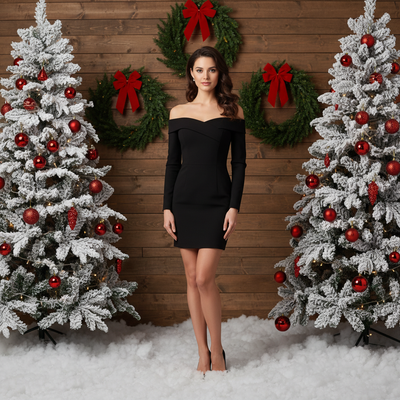
Quick answer: Black Elegance – Winter Glam Studio is an AI Christmas photo style built around black wardrobe, a rich wooden backdrop, snow-dusted flooring, and twin Christmas trees trimmed in red and gold. Bright, neutral studio lighting gives the image an editorial, magazine-style finish. Using PiXmas, you upload one photo from your phone and receive a photorealistic portrait in this look, ready for cards, wallpapers, or social posts.
Black Elegance – Winter Glam Studio is where timeless style meets cinematic holiday magic. Imagine a photorealistic portrait set against a rich wooden background, the floor dusted in snow, and twin Christmas trees framing the scene with red and gold ornaments that glimmer like jewelry. Bright, neutral light with warm edges creates a polished, editorial glow that feels flattering and festive. Whether it's a solo moment of quiet confidence or a natural group pose, this style turns your favorite Christmas photos into a fashion-forward holiday statement.
Why Choose This Style?
This look is crafted for those who love the sophistication of black attire paired with the sparkle of the season. The wardrobe adapts automatically to your uploaded photo, balancing modern elegance and contrast so you look refined without losing your personal style. The studio's wooden backdrop adds a grounded, cozy texture, while red and gold accents deliver a luxe finish that feels editorial without being overdone. The result is a cinematic portrait that feels like a magazine cover, yet remains warm and personal.
Powered by our AI Christmas Photo Studio, Black Elegance – Winter Glam Studio makes professional-quality images accessible to everyone. There's no need for complicated lighting setups, rented studios, or hours of editing. The AI harmonizes colors, enhances details, and applies flattering, bright-neutral lighting with a gentle warm edge. For a single subject, it places you standing confidently between two decorated trees, with wreaths and festive decor behind. For multiple people, it composes a natural, balanced group arrangement inside the same winter studio scene while preserving personality and connection. It's fast, consistent, and beautifully photoreal.
Perfect For These Occasions
Holiday cards that feel like a keepsake: print your portrait as a premium Christmas Card and share a message that looks as good as it feels. The warm-edged lighting and subtle sparkle translate beautifully to print, bringing depth and richness to every detail.
Social announcements and banners: showcase your seasonal style across social media, websites, or email headers. The editorial finish turns everyday Christmas Photos into eye-catching visuals that elevate your brand, family story, or festive update.
Family and couple portraits: whether you're celebrating an engagement, marking a first holiday together, or gathering generations, the studio composition adapts to groups so everyone looks cohesive. It's an easy way to create coordinated Christmas Pictures without matching outfits or complex planning.
Corporate and creator branding: ideal for teams, newsletters, and campaign visuals that need a luxe, on-brand look. The clean wooden background and red-and-gold palette deliver holiday energy without visual clutter, perfect for polished marketing.
Digital decor: turn your final image into a high-resolution Christmas Wallpaper for desktop or mobile. The strong lines, bright-neutral lighting, and clean background make it work well on screens without overpowering your icons and apps.
How to Create Your Black Elegance – Winter Glam Studio
1) Choose your favorite photo (or photos). For a solo portrait, select an image where your face is clear and well-lit. For groups, pick a shot with everyone visible, or upload separate photos and let the AI harmonize the look.
2) Upload to the AI Christmas Photo Studio. The system analyzes your image and automatically adapts wardrobe styling for modern elegance and contrast. It places a single subject standing between two Christmas trees with wreaths and festive decor in the background, or naturally poses multiple people within the same winter studio scene.
3) Preview and fine-tune. Adjust crop, framing, and subtle color choices if you wish. The bright, neutral lighting with warm edges is designed to flatter a range of skin tones while preserving texture and detail for a photoreal, editorial finish.
4) Download for every use. Export high-resolution files for prints, a premium Christmas Card, or shareable formats for social and email. You can also generate versions sized for a crisp Christmas Wallpaper on desktop and mobile, so your seasonal look follows you everywhere.
Beyond speed and convenience, AI helps you create consistent, professional imagery without the stress of studio bookings or styling guesswork. You get the confidence of a polished shoot with the ease of a few clicks.
Give your holiday memories the spotlight they deserve. Step into Black Elegance – Winter Glam Studio and transform your moments into fashion-forward Christmas Photos that feel both classic and current.
What makes this style different from other Christmas photo styles?
Most Christmas photo styles lean on plaid, pastel, or rustic cabin themes. Black Elegance – Winter Glam Studio takes the opposite approach, pairing dark, tailored wardrobe with a warm wooden backdrop and metallic red-and-gold accents for a fashion-editorial mood rather than a cozy cottage one.
The bright, neutral lighting with warm edges is closer to a magazine studio shoot than a candlelit or fireside scene, which makes it a good pick if you want your Christmas pictures to feel polished and current rather than nostalgic.
What photo should you upload for the best result?
A single, front-facing photo with good lighting and a clearly visible face gives PiXmas the most detail to work with. Avoid heavy sunglasses, hats that hide the face, or extreme angles, since the AI needs a clear reference to build the black wardrobe and studio composition around.
For group versions, a photo where every face is visible works best. You can also upload separate photos of each person and let the AI arrange them together inside the same wooden-and-tree backdrop.
Who is this Christmas photo style best for?
This look suits people who want their Christmas pictures to feel more fashion-forward than festive-casual: couples marking an anniversary or first holiday together, professionals who want a striking image for a newsletter or profile, and anyone who prefers a sleek black-and-gold palette over traditional red-and-green sweaters.
It also works well for small friend groups or families who want a coordinated look without shopping for matching outfits, since the wardrobe styling is applied automatically after upload.
How does PiXmas compare to a photographer or DIY setup?
- Photography educators using Google Trends report that searches for terms like “Christmas card photos” remain fairly constant through much of the year, then trend upward from September or October and spike in December. (Tech Photo Guy – Google Trends for Photographers, 2018)
- Google’s Holiday Trends reports that many Christmas‑related queries in the US, including decorating and baking topics, spike each December, illustrating that demand for Christmas imagery and content concentrates late in the year. (Google – Holiday Trends (Year in Search 2025), 2025)
- A general guide to using Google Trends recommends setting multi‑year ranges to spot seasonality, noting that Christmas‑related terms consistently show seasonal spikes that can guide when to publish holiday photo content. (Cemoh – How to Use Google Trends: A Complete Guide, 2026)
Limitations
Black Elegance – Winter Glam Studio images are AI-generated stylized portraits, not physical photos taken in a real studio, so fine details like fabric texture or ornament placement are interpretations rather than exact reproductions.
Photos with several faces close together may render with slightly less consistency than a solo or couple upload, since the AI is balancing more detail at once. Wardrobe styling is applied automatically and can't be swapped for a specific outfit choice.
For anyone who wants a sleek, editorial take on Christmas pictures rather than a traditional cozy scene, Black Elegance – Winter Glam Studio through PiXmas turns one phone photo into a polished black-and-gold studio portrait in minutes, no shoot or wardrobe planning required.
Frequently asked questions
What is the Black Elegance – Winter Glam Studio style?
It is a Christmas photo style featuring black wardrobe, a wooden studio backdrop, snow-dusted flooring, and twin Christmas trees decorated in red and gold. Bright, neutral lighting with warm edges gives the finished portrait an editorial, magazine-style look.
What photo do I need to upload to get this look?
One clear, well-lit photo where your face is visible works best. PiXmas uses that single uploaded photo to build the black-wardrobe portrait against the wooden backdrop and twin-tree studio scene.
Can I put more than one person in a Black Elegance photo?
Yes, PiXmas can compose a group version of this style, arranging multiple people within the same wooden backdrop and twin-tree scene. Photos with several close-together faces may look slightly less uniform than a solo or couple portrait.
Can I turn this into a printed Christmas card?
Yes, once your Black Elegance – Winter Glam Studio portrait is generated, PiXmas lets you export a high-resolution file suitable for printing as a Christmas card or using as a digital wallpaper.
How much does an at-home Christmas photoshoot cost?
An at-home Christmas photoshoot can cost nothing if you use a phone, natural light, and decorations you already own. Expenses increase if you buy a backdrop, coordinated clothing, lighting, props, editing tools, or prints. Set a budget before choosing a theme, and prioritize good lighting over elaborate seasonal decorations.
What are some easy Christmas photoshoot ideas at home?
Easy at-home Christmas photo ideas include decorating the tree, reading holiday books, baking cookies, wrapping gifts, wearing pajamas, or posing beside a window with warm lights. Choose an activity your family already enjoys so expressions feel natural. A simple background and one recognizable holiday element usually look better than a crowded set.