Backdrop Christmas Pictures
Backdrop Christmas pictures create an editorial holiday portrait with red-and-white decor, glowing string lights, bright flash lighting, and cinematic shadows. The PiXmas style applies this polished backdrop to a clear uploaded portrait without requiring a physical studio, seasonal wardrobe, or custom set.
When to Plan Backdrop Christmas Pictures
Plan backdrop Christmas pictures before holiday schedules and printing deadlines become crowded. Search interest for Christmas card photos stays relatively steady through much of the year, begins rising around September or October, and spikes in December (Tech Photo Guy – Google Trends for Photographers, 2018). Preparing in early fall gives you time to choose outfits, test backdrop colors, review facial details, and correct distracting shadows. If the image will become a card or framed print, check the final crop and print specifications before ordering. For digital sharing, preview the portrait on different screens because brightness, red tones, and shadow detail can vary by display.
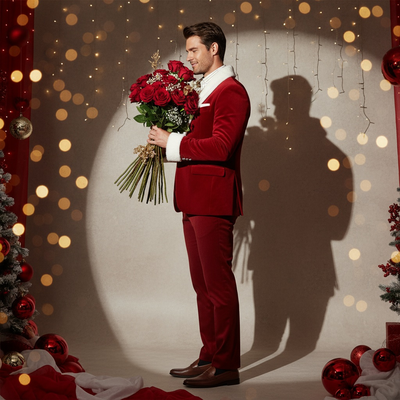
The magic of Christmas is in the air, and with it comes the opportunity to capture unforgettable moments with an enchanting photoshoot tailored for the holiday season. Whether you're planning to surprise your loved ones with a stunning Christmas card or looking to create the perfect Christmas pictures for your festive gallery wall, the "backdrop Christmas" style is your answer. Let's explore how you can bring this editorial-inspired look to life with the help of an AI Christmas Photo Studio.
Crafting the Picture-Perfect Backdrop
Creating a striking background is the first step toward the ethereal elegance of your Christmas photos. In the "backdrop Christmas" style, the scene is adorned with luxurious red and white decor, accompanied by gently glowing string lights that add a touch of magical warmth. The setup feels like stepping into a sophisticated magazine spread, especially when a neutral wall, softly highlighted by a round spotlight, casts a sharp, cinematic shadow that enhances the overall aesthetic. When captured through a professional AI Christmas Photo Studio, this backdrop becomes the heart of your Christmas pictures, providing the ideal canvas for your festive imagery.
Stunning Wardrobe for a Glamorous Ensemble
Your wardrobe choice can transform an ordinary photoshoot into a dazzling holiday masterpiece. In our romantic "backdrop Christmas" style, we recommend outfits that marry festivity with finesse. Imagine wearing a red and white Santa-inspired dress, paired with chic white boots, a nod to holiday tradition with a contemporary twist. When involving multiple family members or a couple, coordinating outfits in harmonious metallic tones of gold and silver adds elegance to the overall scene. This choice ensures that each subject stands out beautifully in the AI Christmas Photo Studio setup.
Posing with Elegance and Poise
The key to capturing luxury in your Christmas pictures lies in the art of posing. For solo subjects, standing gracefully in profile, perhaps smiling gently while holding a bouquet of roses, instantly elevates the mood. This subtle pose, accentuated by rich shadows and sparkling bokeh from Christmas lights, turns a simple gesture into a magazine-worthy portrait. For group photos, consider arranging everyone in poses that feel natural and cohesive.
The Role of Lighting in Creating Magic
Lighting is the soul of any captivating photograph, and it's no different for your Christmas photos. In our "backdrop Christmas" style, bright flash lighting is delicately balanced to emphasize facial detail while adding depth through crisp shadows and glowing reflections. This lighting approach enhances the rich red and white palette while weaving in golden undertones for signature Christmas elegance.
Transforming Your Photos into Keepsakes
Whether these photos are meant to adorn the walls of your home or to be shared as personalized Christmas cards, the "backdrop Christmas" style turns each snapshot into a lasting keepsake. The enchanting atmosphere, paired with a personal touch, brings each image to life. By working with an AI Christmas Photo Studio, you can ensure every photo is finished with rich color and holiday warmth, preserved as part of your Christmas pictures and Christmas card collection this season.
What makes this style different from other Christmas photo styles?
Backdrop Christmas leans into a high-fashion, editorial mood rather than a cozy, homey one. The round spotlight, neutral wall, and cinematic shadow give it the look of a magazine cover shoot instead of a casual family snapshot. Bright flash lighting and a red-and-white color story set it apart from softer, candlelit or cabin-style Christmas looks.
What photo should you upload for the best result?
A clear, front-facing photo with good lighting and an unobstructed face gives the AI the most detail to work with. Avoid sunglasses, heavy shadows, or low-resolution images, since the style relies on sharp facial clarity against a dramatic backdrop. A single well-lit photo of yourself or a couple tends to translate most cleanly into the finished portrait.
Who is this Christmas photo style best for?
This look suits anyone who wants a glamorous, magazine-style Christmas portrait rather than a rustic or playful one. Individuals creating a striking solo card, couples wanting a coordinated editorial photo, or small groups in matching metallic tones all fit naturally into this backdrop-driven aesthetic. It's less suited to casual pet photos, since the posed, fashion-forward styling is built around human subjects.
How does PiXmas compare to a photographer or DIY setup?
- Google’s Holiday Trends reports that many Christmas‑related queries in the US, including decorating and baking topics, spike each December, illustrating that demand for Christmas imagery and content concentrates late in the year. (Google – Holiday Trends (Year in Search 2025), 2025)
- Photography educators using Google Trends report that searches for terms like “Christmas card photos” remain fairly constant through much of the year, then trend upward from September or October and spike in December. (Tech Photo Guy – Google Trends for Photographers, 2018)
- A general guide to using Google Trends recommends setting multi‑year ranges to spot seasonality, noting that Christmas‑related terms consistently show seasonal spikes that can guide when to publish holiday photo content. (Cemoh – How to Use Google Trends: A Complete Guide, 2026)
Limitations
Backdrop Christmas images are AI-generated stylized portraits, not physical photos taken in a real studio. Details like fabric texture, shadow placement, or background elements may look slightly different from a true photoshoot. Photos with several faces, especially in larger group shots, may render with less consistency than a solo or couple portrait. PiXmas is a strong fit if you want an editorial Christmas look without booking a studio, but it is not a replacement for a professional shoot when exact physical staging matters.
Backdrop Christmas suits anyone wanting a polished, editorial-style holiday portrait, and PiXmas makes it possible to get that magazine-shoot look from a single uploaded photo without booking a studio.
Frequently asked questions
What is the backdrop Christmas photo style?
Backdrop Christmas pictures use a staged, editorial holiday setting with coordinated decor, visible light accents, and controlled shadows. Unlike a cozy living-room portrait, the emphasis is on a polished fashion look: a limited red-and-white palette, crisp facial lighting, and a background that feels intentionally designed rather than casually documented.
How can I make a Christmas photo backdrop at home?
Start with an uncluttered wall or corner, then add a few coordinated decorations, greenery, fabric, or string lights. Keep the subject separated from the background when space allows so shadows and decorations remain distinct. Frame tightly to hide unrelated furniture, cords, and room edges that could weaken the staged effect.
What should I wear for backdrop Christmas pictures?
Solid red, white, cream, black, gold, or silver clothing generally suits an editorial Christmas backdrop. Choose garments that separate clearly from the background and avoid dense patterns that compete with lights or decorations. For families or couples, coordinate the color palette rather than requiring everyone to wear identical outfits.
What source photo works best for an AI Christmas backdrop?
A clear, well-lit, front-facing portrait with visible facial features works best. Avoid sunglasses, motion blur, harsh shadows, heavy filters, or objects covering the face. A neutral expression or natural smile usually provides useful detail, while a clean outline around the hair and shoulders can help the generated backdrop appear more convincing.
How should I light a Christmas backdrop photo?
Use a consistent main light that exposes faces clearly without washing out string lights or reflective decorations. Avoid mixing daylight with strongly colored household bulbs when possible, since conflicting color temperatures can distort skin tones. Check the brightest decorations and darkest facial shadows before shooting, then make restrained adjustments to warmth, contrast, and saturation.
Can families or groups use this Christmas photo style?
Yes, families and groups can use an editorial Christmas backdrop, although crowded or overlapping faces may produce less consistent results in AI-generated images. Choose a source photo where each face is sharp and unobstructed. Coordinated clothing, similar lighting across subjects, and a simple arrangement can make the finished composition feel more cohesive.
Can backdrop Christmas pictures be used for holiday cards?
Yes, backdrop Christmas pictures can work for printed or digital holiday cards when the finished file meets the card provider’s size, crop, and resolution requirements. Review faces, hands, text placement, and edge cropping before ordering. A test print can also reveal color or shadow differences that are less obvious on a screen.
What are the limitations of AI Christmas backdrop photos?
AI can alter facial details, hands, jewelry, clothing edges, text, and small decorations, especially when the source image is blurry or crowded. Results should be inspected closely rather than treated as exact reproductions. PiXmas is one example tool, but important portraits may still benefit from a photographer or a carefully built physical backdrop.