Queen of Lights in the Snow
Quick answer: Queen of Lights in the Snow is a PiXmas Christmas photo style that places your uploaded photo in a misty, snow-covered pine forest lit by multicolored fairy lights against a blue twilight sky. Upload one photo and the PiXmas iOS app generates a stylized portrait in this scene, suited for holiday cards, wallpapers, and social posts. Pixmas is an alternate spelling of the same app.
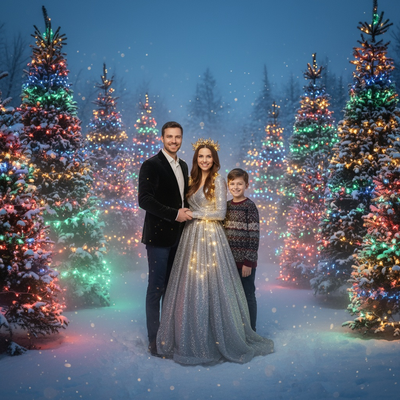
Create beautiful Christmas pictures with our Queen of Lights in the Snow style.
As the holiday season approaches and the air turns crisp with winter's chill, capturing the magic of Christmas through photography becomes a joyfully awaited tradition. This season, why not transform your cherished Christmas photos into something truly enchanting with the 'Queen of Lights in the Snow' style, offered by PiXmas? Imagine yourself or your loved ones standing in a mystical, snow-covered pine forest, surrounded by colorful fairy lights that reflect the wonder of the season. This isn't just a photo; it's an immersive scene built from your own picture.
Experience the Magic of "Queen of Lights in the Snow"
With 'Queen of Lights in the Snow', your Christmas pictures take on a life of their own, filled with ethereal beauty and enchanting detail. When you upload a photo, whether it's a solo portrait or a cherished family moment, PiXmas places you amid a forest glowing in serene blue twilight. Gentle mist swirls around snow-draped pines adorned with multicolored lights that sparkle like jewels. It's this dreamy setting that makes every image work as a unique Christmas wallpaper that speaks directly to the heart.
Transform Your Portraits with Seamless AI Integration
PiXmas brings this theme to life by blending technology and artistry. Upload a photo of a single person and they're portrayed kneeling in the snow, the shimmer of their outfit reflecting the glow of wrapped light strands. For family photos or group portraits, the AI carries the same lighting and setting across everyone in frame. The result is a Christmas photo that feels considered rather than rushed, without a studio visit.
Create Lasting Memories with Stunning Visuals
Your Christmas card could be more than a seasonal greeting; it could be a striking showcase of style. Choosing this look does more than capture a moment, it builds a small story, one where each subject stands like royalty in a winter wonderland. 'Queen of Lights in the Snow' portraits make Christmas pictures that stand out among family, friends, and colleagues, adding warmth and a bit of drama to holiday greetings.
Infuse Your Holidays with Ethereal Beauty
This holiday season, create Christmas photos that capture the mood of the season rather than just document it. The blue twilight tones set against warm, sparkling lights illuminate the subjects in a distinctive way, turning an ordinary photo into something closer to a painted scene. Whether you want to decorate your home or find a new Christmas wallpaper for your phone, this style turns a photo into a keepsake of winter's quiet, glowing calm.
Bring the Spirit of Christmas to Life with AI Craftsmanship
PiXmas gives you a new way to explore this kind of creative portrait during the holidays. By turning your Christmas photos into a scene of light and snow, you're not just saving a memory, you're giving it a bit more atmosphere. Try 'Queen of Lights in the Snow' this season and let your Christmas pictures carry a little more wonder, light, and warmth.
What makes this style different from other Christmas photo styles?
Most Christmas photo styles lean on warm cabin light, fireplaces, or red-and-gold color schemes. Queen of Lights in the Snow instead uses a cool blue twilight backdrop, drifting mist, and strands of multicolored fairy lights wrapped through snow-covered pines. The contrast between the cool forest tone and the warm glow of the lights is what gives this style its glamorous, almost regal look rather than a cozy, rustic one.
What photo should you upload for the best result?
A clear, front-facing photo with good lighting and an unobstructed face gives PiXmas the most detail to work with. A single uploaded photo works well for solo portraits and couples. For a group or family photo, choose a shot where each person's face is visible and not turned away or heavily shadowed, since the AI needs to read each face to place it convincingly in the snowy scene.
Who is this Christmas photo style best for?
This style suits anyone who wants a Christmas picture with a bit more drama than a standard family photo. Solo portraits get a queen-like, editorial feel that works well for a statement card or wallpaper. Couples can use it for a joint holiday card, and families or groups of friends can turn a casual photo into a matching, styled winter scene. PiXmas handles all of these from the same one-photo workflow, so no separate outfits or props are needed.
How does PiXmas compare to a photographer or DIY setup?
- A general guide to using Google Trends recommends setting multi‑year ranges to spot seasonality, noting that Christmas‑related terms consistently show seasonal spikes that can guide when to publish holiday photo content. (Cemoh – How to Use Google Trends: A Complete Guide, 2026)
- Google’s Holiday Trends reports that many Christmas‑related queries in the US, including decorating and baking topics, spike each December, illustrating that demand for Christmas imagery and content concentrates late in the year. (Google – Holiday Trends (Year in Search 2025), 2025)
- Photography educators using Google Trends report that searches for terms like “Christmas card photos” remain fairly constant through much of the year, then trend upward from September or October and spike in December. (Tech Photo Guy – Google Trends for Photographers, 2018)
Limitations
Queen of Lights in the Snow images are AI-generated stylized pictures, not physical photos taken on a real snowy set. Fine details like exact light placement, fabric texture, or background elements are generated by the AI and will not match an actual location shoot. Photos with several faces, unusual angles, or heavy shadow may render less consistently than a clear solo or couple photo, so results can vary more with larger groups.
For a Christmas picture that feels more like a styled portrait than a snapshot, Queen of Lights in the Snow through PiXmas turns a single uploaded photo into a glowing, twilight forest scene without a studio visit or DIY light setup.
Frequently asked questions
What is the Queen of Lights in the Snow Christmas photo style?
It is an AI-generated Christmas photo style that places your photo in a misty, snow-covered pine forest lit with multicolored fairy lights against a blue twilight sky, giving portraits an elegant, almost regal winter look.
What kind of photo should I upload for this style?
Use a clear, well-lit, front-facing photo with your face visible and unobstructed. PiXmas uses this one photo to build the snowy, light-strung scene, so a sharper source photo generally gives a cleaner result.
Can I use this style for a family or group Christmas photo?
Yes, PiXmas can apply Queen of Lights in the Snow to family or group photos. Results tend to be most consistent when every face in the photo is clearly visible, since larger groups can render with more variation than a solo or couple shot.
Can I include my pet in a Queen of Lights in the Snow photo?
If your pet appears in the uploaded photo alongside you, PiXmas will attempt to place them in the scene as well, though this style is primarily designed around portrait subjects rather than pet-focused compositions.
Are the finished images real photos taken outdoors?
No. Queen of Lights in the Snow results are AI-generated stylized images built from your uploaded photo, not photographs taken in an actual snowy forest with real lighting or props.