Golden Palace Christmas Pictures
Quick answer: Golden Palace Christmas is an AI photo style from PiXmas (also spelled Pixmas) that places you in a luxury mansion hall with a white-and-gold tree, a garland-wrapped staircase, and warm candlelight. Upload one photo in the iOS app and it's restyled into a cinematic holiday portrait in lace or satin formalwear, ready to use as a Christmas card or wallpaper.
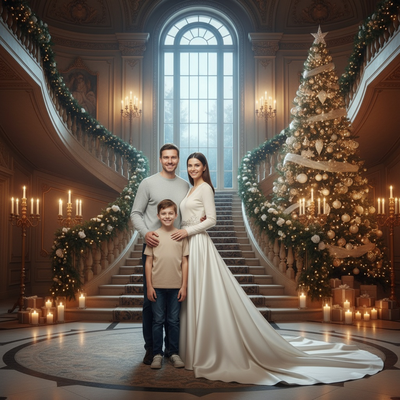
Create beautiful Christmas pictures with our Golden Palace Christmas style.
Step into a realm of elegance and sophistication with the Golden Palace Christmas photo style. Imagine yourself or your loved ones surrounded by a scene that radiates majesty and timeless beauty, reminiscent of a luxury winter gala night. Our AI Christmas Photo Studio transforms your cherished images into cinematic Christmas portraits. Whether you're featuring a single elegant figure in a lace or satin gown or gathering loved ones for a majestic family photo, this style wraps you in the splendor of a deluxe holiday setting, perfect for crafting memorable Christmas photos that last a lifetime.
Discover the Magic of the Golden Palace Setting
Immerse yourself in the opulence of a luxury mansion hall, where every detail is thoughtfully curated to exude grandeur. A tall arched window casts a natural glow across the room, and the sparkling white-and-gold Christmas tree serves as a breathtaking centerpiece, complemented by a grand staircase wrapped in garlands and candles. This setup provides a cinematic backdrop that makes your Christmas pictures stand out, elevating them to art-quality keepsakes. Whether you're designing a Christmas card or seeking the perfect Christmas wallpaper, the Golden Palace setting captures the spirit and sophistication of the holiday season.
Create a Cinematic Christmas Portrait
Our Golden Palace Christmas style specializes in creating portraits that evoke cinematic wonder. For individuals, the scene places you elegantly at the bottom of an impressive staircase beside a glowing tree, capturing a moment of grace and charm. When multiple people fill the frame, they're naturally posed amid the grand interior, each contributing to the luxurious tapestry of your Christmas photos. These intricate elements come together to create timeless images, perfect for a photo album or a stunning Christmas wallpaper.
Wardrobe Fit for a Luxury Affair
To complement the grandeur of the setting, the wardrobe is nothing short of spectacular. Picture yourself or your loved ones in a lace or satin white gown with an elegant train, embodying glamour and refinement. The attire is chosen to harmonize with the rich golden candlelight and the natural window glow that bathes the room. This synergy between wardrobe and environment amplifies the majestic ambiance, making your Christmas pictures unforgettable.
The Timeless Appeal of Golden Candlelight
The golden candlelight casts a warm, inviting glow that enhances the romantic and regal atmosphere of the scene. This lighting sets the mood and highlights the intricate details of the decor, from the delicate lace of your gown to the shimmering ornaments on the tree. The interplay of light and shadow enriches each image, giving your Christmas pictures depth and texture, ideal for a Christmas card that friends and family will treasure.
Create Lasting Memories with Our AI Christmas Photo Studio
Entrust the creation of your holiday memories to our AI Christmas Photo Studio, designed to transform your photos into captivating keepsakes with ease. Whether it's a singular, regal portrait or a family gathering full of warmth, your Christmas photos will reflect the grandeur of the season, ready to share as a keepsake or set as the perfect Christmas wallpaper.
What photo should you upload for the best result?
Start with a clear, well-lit photo where the face is fully visible and not obscured by sunglasses, hats, or heavy shadow. A straight-on or slightly angled shot works better than an extreme side profile for this style, since the AI needs to see facial features clearly to place you convincingly against the arched window and staircase backdrop. For a family or couple version, a photo where everyone's face is visible tends to produce a more cohesive palace scene.
Who is this Christmas photo style best for?
Golden Palace Christmas suits anyone who wants a formal, gala-worthy holiday portrait rather than a casual living-room scene. It works well for a single glamorous portrait, a couple wanting an elegant anniversary-style card, or a family aiming for a more polished, upscale Christmas photo. Because the wardrobe leans into lace and satin formalwear, it's a strong pick for those who want their holiday card to feel more like a black-tie invitation than a snapshot.
How does PiXmas compare to a photographer or DIY setup?
- Google’s Holiday Trends reports that many Christmas‑related queries in the US, including decorating and baking topics, spike each December, illustrating that demand for Christmas imagery and content concentrates late in the year. (Google – Holiday Trends (Year in Search 2025), 2025)
- A general guide to using Google Trends recommends setting multi‑year ranges to spot seasonality, noting that Christmas‑related terms consistently show seasonal spikes that can guide when to publish holiday photo content. (Cemoh – How to Use Google Trends: A Complete Guide, 2026)
- Photography educators using Google Trends report that searches for terms like “Christmas card photos” remain fairly constant through much of the year, then trend upward from September or October and spike in December. (Tech Photo Guy – Google Trends for Photographers, 2018)
Limitations
Golden Palace Christmas pictures are AI-generated stylized images, not physical photos taken on a real mansion set. Details like staircase shape, candle placement, or gown texture are interpreted by the AI and will vary slightly between generations rather than matching an exact reference. Photos with several faces in one frame may render with less consistency than a solo or couple photo, so results can vary more as the group grows. PiXmas is a strong fit if you want a fast, elegant Christmas portrait from a single uploaded photo without booking a studio.
For anyone who wants a formal, gala-style Christmas portrait without booking a mansion or hiring a photographer, PiXmas turns one uploaded photo into a Golden Palace scene complete with candlelight, a grand staircase, and elegant wardrobe, ready for a card or wallpaper in minutes.
Frequently asked questions
What is the Golden Palace Christmas photo style?
It's an AI Christmas photo style that places your uploaded photo into a luxury mansion hall scene with a white-and-gold tree, an arched window, a garland-wrapped staircase, and warm candlelight, dressed in formal lace or satin holiday attire.
What kind of source photo works best for this style?
Use a clear, front-facing photo with good lighting and an unobstructed face. PiXmas uses this single uploaded photo to generate the Golden Palace scene, so avoid sunglasses, heavy filters, or extreme angles for best results.
Can I create a Golden Palace Christmas photo with my whole family?
Yes, you can upload a group photo for a family version of the scene. Results with multiple faces may look slightly less uniform than a solo or couple portrait, but the palace setting and wardrobe styling still apply.
Can I turn my Golden Palace Christmas picture into a printed card?
Yes, the finished image works well as a printable Christmas card, a digital greeting, or a phone and desktop wallpaper. Since it's a high-resolution stylized portrait, it holds up well for printing.
How do I set up a Christmas photoshoot in a small space?
Use one uncluttered wall, corner, doorway, or section beside the Christmas tree as your set. Remove distracting furniture, place subjects several steps in front of the background when possible, and frame tightly. A blanket, stool, greenery, and string lights can create a complete scene without filling the entire room.
What can I use as a Christmas photo backdrop at home?
A plain wall, curtain, bedspread, fireplace, decorated tree, porch, or neatly made bed can work as a Christmas photo backdrop. Add only a few intentional elements, such as greenery, wrapped boxes, paper stars, or a textured blanket. Check the frame for cords, outlets, clutter, and objects that appear to grow from someone’s head.