Golden Ballroom Countdown Christmas Pictures
Quick answer: Golden Ballroom Countdown is a PiXmas AI photo style that places your uploaded portrait in a glamorous ballroom scene with chandeliers, gold drapery, cascading confetti, and a Happy New Year banner. Using the PiXmas iOS app, you upload one photo and the AI generates a cinematic, photorealistic Christmas and New Year picture ready for cards, wallpaper, or social sharing.
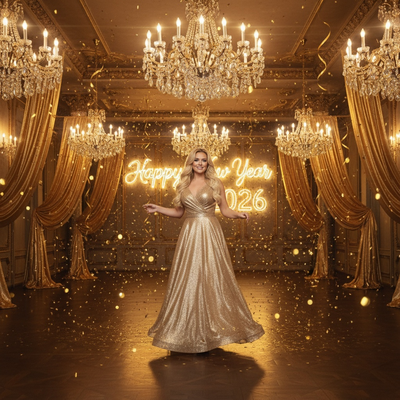
Create beautiful Christmas pictures with our Golden Ballroom Countdown style.
As the festive spirit envelops us, there's no better time to capture the joyous moments of the holiday season with exquisite Christmas photos. Whether you are celebrating a quiet family gathering or an extravagant New Year's bash, capturing the elegance and glamour of these moments can be a delightful way to relive them. Introducing the 'Golden Ballroom Countdown' photo style, an enchanting blend of sophistication and festive cheer, crafted to transform your regular snapshots into cinematic scenes. Step into the AI Christmas Photo Studio, where technology meets artistry to create timeless memories in every frame.
Transform Your Holiday Moments with AI Christmas Photo Studio
The 'Golden Ballroom Countdown' style offered by the AI Christmas Photo Studio provides an easy way to transform your holiday moments into striking Christmas pictures. Imagine yourself or your loved ones elegantly posed under glittering chandeliers and golden drapery, with confetti cascading festively around you. This isn't just an ordinary photo edit; it's a scene that captures the warmth of the holiday season in a single frame. The result is a photograph that reads like a treasured Christmas card, resonant with the energy of a New Year celebration.
Embrace Glamour with Christmas Pictures to Cherish
Christmas pictures have the power to encapsulate the pure joy of the holiday season. The Golden Ballroom Countdown style is built to do just that, adapting automatically to your uploaded photo to deliver photorealistic indoor portraits. Whether spotlighting a single graceful pose or a group gathered in celebration, each photo is steeped in warmth and glamour. The ambient lighting and cinematic mood set the stage for a luxurious feel, making these Christmas pictures a pleasure to revisit long after the New Year bells have rung.
Create Mesmerizing Christmas Wallpaper
There's nothing quite like a captivating Christmas wallpaper that embodies the spirit of the season. With AI Christmas Photo Studio, your personalized Golden Ballroom Countdown image serves as the perfect backdrop for your devices. The rich gold tones, the elegance of the ballroom, and the celebratory mood create a scene that is both calming and inspiring. Each glance at your screen brings back those joyous New Year's Eve moments, making the holiday spirit last well beyond the season.
Personalize Your Festive Greetings with Unique Christmas Photos
Personalize your holiday greetings with a unique Christmas photo from the Golden Ballroom Countdown collection. Whether you're crafting a memorable Christmas card or sending digital greetings to loved ones far away, these photos are sure to impress. The elegance of the gold gowns and black tuxedos paired with the festive ballroom setting shows a level of detail that goes beyond the ordinary. Let the charm of your personalized Christmas photo make a statement, conveying festive greetings and a sense of shared celebration.
Capture Stunning Memories with AI Christmas Photo Studio
The AI Christmas Photo Studio offers a fresh way to capture memories that reflect the essence of Christmas and New Year's celebrations. The Golden Ballroom Countdown style is designed to adapt effortlessly, giving every photo the opulent atmosphere of a grand ballroom, complete with golden ribbons and a 'Happy New Year 2026' banner. Set against soft spotlight and cinematic elegance, the resulting Christmas photos become keepsakes worth revisiting each holiday season.
What makes this style different from other Christmas photo styles?
Golden Ballroom Countdown leans into glamour rather than cozy fireside warmth. Instead of sweaters and pine branches, the scene uses chandeliers, gold drapery, confetti, and a New Year banner to create a black-tie celebration mood.
The lighting is a soft spotlight cinematic look rather than a natural daylight or firelit tone, which sets it apart from more rustic PiXmas holiday styles.
What photo should you upload for the best result?
Choose a clear, front-facing photo where the face is well lit and not obscured by sunglasses, hats, or heavy shadow. A shoulders-up or half-body shot taken indoors or outdoors works well since the AI focuses on facial detail while it builds the ballroom setting around you.
One well-lit uploaded photo per person produces the sharpest likeness, so avoid blurry or low-resolution images if you plan to print the result as a card.
Who is this Christmas photo style best for?
This style suits couples wanting an elegant anniversary or New Year's Eve keepsake, solo users who want a glamorous festive portrait, and families that prefer a formal, ballroom-style card over a casual snapshot.
It also works for professionals sending polished holiday greetings to clients, since the tuxedo and gown aesthetic reads as more formal than typical family Christmas photo styles.
How does PiXmas compare to a photographer or DIY setup?
- Photography educators using Google Trends report that searches for terms like “Christmas card photos” remain fairly constant through much of the year, then trend upward from September or October and spike in December. (Tech Photo Guy – Google Trends for Photographers, 2018)
- Google’s Holiday Trends reports that many Christmas‑related queries in the US, including decorating and baking topics, spike each December, illustrating that demand for Christmas imagery and content concentrates late in the year. (Google – Holiday Trends (Year in Search 2025), 2025)
- A general guide to using Google Trends recommends setting multi‑year ranges to spot seasonality, noting that Christmas‑related terms consistently show seasonal spikes that can guide when to publish holiday photo content. (Cemoh – How to Use Google Trends: A Complete Guide, 2026)
Limitations
Golden Ballroom Countdown images are AI-generated stylized pictures, not photographs taken in a real ballroom. Details like jewelry, fabric texture, or background decor may vary slightly from generation to generation.
Photos with several faces or people at odd angles may render less consistently than a solo or couple photo, since the AI has more detail to reconcile across a group. For the most reliable likeness, PiXmas works best when the source photo is a clear, single-subject or two-person image.
For anyone who wants a glamorous, ballroom-style Christmas or New Year picture without booking a photographer, PiXmas turns a single uploaded photo into a polished Golden Ballroom Countdown scene in minutes, making it a practical choice for cards, wallpaper, and festive greetings.
Frequently asked questions
What is the Golden Ballroom Countdown Christmas photo style?
It is a PiXmas AI photo style that places your uploaded portrait into a glamorous ballroom scene with chandeliers, gold drapery, confetti, and a Happy New Year banner, turning a regular photo into a cinematic holiday picture.
What kind of source photo works best for this style?
A clear, well-lit, front-facing photo with the face fully visible works best. Avoid sunglasses, heavy shadows, or extreme angles so the AI can accurately match your features to the ballroom scene.
Can I use a Golden Ballroom Countdown photo as a printed Christmas card?
Yes, the PiXmas output is a high-resolution image suitable for printing as a Christmas or New Year card, sharing digitally, or setting as a wallpaper.
Does the Golden Ballroom Countdown style work for group photos?
It can be used with group photos, though results with a single person or couple tend to render more consistently than photos with several faces, since PiXmas has to balance detail across every person in the frame.
Can I choose a different holiday style later?
Yes, PiXmas offers many Christmas photo styles beyond Golden Ballroom Countdown, so you can generate additional looks from the same or a different uploaded photo whenever you like.