Burgundy Craft – Holiday Wreath Studio Christmas Photo
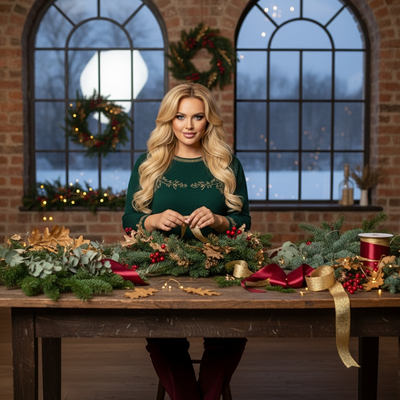
Quick answer: Burgundy Craft – Holiday Wreath Studio is a PiXmas AI Christmas photo style that turns one uploaded photo into a cinematic portrait at a wreath-making table with evergreen branches, gold leaves, and satin ribbons. Wardrobe leans dark and elegant with burgundy or gold accents under soft studio lighting. Solo uploads show a single crafting moment; group photos become a shared table scene, all generated from your phone photo in the PiXmas app.
Burgundy Craft – Holiday Wreath Studio is where quiet winter magic meets refined craft. In this AI Christmas Photo Studio, your uploaded photo becomes a lifelike, cinematic portrait set at a cozy studio table strewn with evergreen branches, golden leaves, and satin ribbons. If you upload one person, the scene focuses on a single moment of making or gently holding a finished wreath. Upload multiple people and the image becomes a shared ritual, everyone naturally arranged around the same warm table, hands busy, eyes bright, and the room softly aglow. This is a style designed to feel personal, tactile, and beautifully real, like the hush of an afternoon spent crafting together.
Why Choose This Style?
Burgundy Craft speaks to the heart of holiday making. The wardrobe tones are deep and elegant, with dark fabrics touched by rich burgundy or soft gold accents that echo the ribbons and metallic leaves on the table. Soft diffused studio lighting renders skin tones faithfully and wraps the scene in calm, creative focus. Every detail looks tangible and close enough to touch, from the matte needles of the greenery to the subtle sheen of a gold leaf catching the light. The result is not just another set of Christmas Photos, but a portrait that feels intimate and handmade.
This style uses photorealistic, cinematic rendering to adapt automatically to your face, body, and expressions. Framing, scale, and posture shift to suit a solo portrait or a small group working side by side, so the final image feels naturally composed, never pasted together. Because it is created in an AI Christmas Photo Studio, you get consistent lighting, a curated craft table scene, and a refined wardrobe aesthetic without booking a set or buying props. It is fast, flexible, and private, while still giving you the warmth and authenticity you want in your holiday visuals.
Choosing an AI approach also means more control over how your story is used. Export print-ready files for a Christmas Card, optimize versions for social feeds, or save a high-resolution background for your laptop or phone. You can generate multiple variations until the mood feels exactly right, ensuring your Christmas Pictures look cohesive across every place you share them.
Perfect For These Occasions
Send something truly personal this season. A single portrait from Burgundy Craft makes a meaningful Christmas Card, especially when paired with a heartfelt message. Families and couples will love the multi-person version, where everyone appears together in a shared, cozy space. These are the kind of Christmas Photos that grandparents frame and friends remember. They also elevate family newsletters, seasonal announcements, or invites to a holiday gathering or wreath-making party.
Online, this style brings warmth to your brand or profile without feeling staged. Share your finished images as Christmas Pictures on social media, add them to your website banner, or turn them into a festive highlight cover. The elegant palette and tactile details also make a stunning Christmas Wallpaper for desktop and mobile, turning your everyday screen into a little window of calm craft and candlelight. For makers and small businesses, the look is perfect for showcasing a refined holiday mood while keeping the focus on people and process.
If you want a visual that feels grounded and genuine rather than glossy or overly posed, Burgundy Craft is the right choice. It captures the spirit of creating together, the pride in handmade details, and the quiet glow that makes winter gatherings feel special.
How to Create Your Burgundy Craft – Holiday Wreath Studio
Getting started is simple. Upload a single photo for a solo portrait or a few photos for a group. The AI adapts automatically: one person will appear crafting or holding a wreath; multiple people will be arranged naturally at the same indoor table, surrounded by greenery, golden leaves, and ribbon spools. The system harmonizes lighting and perspective so everyone looks like they were truly there together.
Next, let the wardrobe refinement do its work. The look leans dark and elegant, with deep red or gold accents that echo the tabletop decor. Soft diffused studio lighting shapes faces gently and brings out the textures that make this style so tactile. If you prefer a quieter or more festive mood, generate a couple of variations; the AI Christmas Photo Studio can fine-tune brightness and contrast while keeping the atmosphere calm and cinematic.
When you have a favorite, choose your output. Pick a vertical crop for a Christmas Card, square for social media, or a widescreen format for a Christmas Wallpaper. Export a high-resolution file for printing and a web-optimized version for sharing. You will have a unified set of Christmas Photos that feel handcrafted, consistent, and ready for every tradition on your list.
Bring your holiday story to life with Burgundy Craft – Holiday Wreath Studio. Upload your photo, choose your favorite look, and let the scene bloom with evergreen, gold, and soft winter light.
What photo should you upload for the best result?
A clear, well-lit photo works best, ideally a headshot or half-body shot where the face is unobstructed and facing forward or at a slight angle. Natural daylight or soft indoor light gives the AI the most accurate detail to work with when rendering the studio table scene.
Avoid heavy filters, sunglasses, or photos where the subject is turned away from the camera, since these can make it harder for the style to match expression and lighting convincingly. For a group version, individual photos where each face is clearly visible tend to blend more naturally than one crowded snapshot.
How does PiXmas compare to a photographer or DIY setup?
- A general guide to using Google Trends recommends setting multi‑year ranges to spot seasonality, noting that Christmas‑related terms consistently show seasonal spikes that can guide when to publish holiday photo content. (Cemoh – How to Use Google Trends: A Complete Guide, 2026)
- Google’s Holiday Trends reports that many Christmas‑related queries in the US, including decorating and baking topics, spike each December, illustrating that demand for Christmas imagery and content concentrates late in the year. (Google – Holiday Trends (Year in Search 2025), 2025)
- Photography educators using Google Trends report that searches for terms like “Christmas card photos” remain fairly constant through much of the year, then trend upward from September or October and spike in December. (Tech Photo Guy – Google Trends for Photographers, 2018)
Burgundy Craft – Holiday Wreath Studio is one of 800+ styles available in the PiXmas app, so you can try this look alongside other holiday scenes without rebooking a shoot or resetting a table each time.
Limitations
This style produces AI-generated stylized images, not physical photographs from a real wreath-making session, so fine details like ribbon texture or leaf placement are interpretations rather than exact recreations of a real studio setup.
Group photos with several faces may render with slightly less consistency than a solo or couple upload, since the AI is balancing more expressions and angles at once. Results can also vary depending on the lighting and clarity of the original photo you provide.
Burgundy Craft – Holiday Wreath Studio turns one phone photo into an elegant, cinematic wreath-making portrait, and PiXmas makes it simple to generate solo or group versions without booking a real studio session.
Frequently asked questions
Do I need a real wreath or craft supplies in my photo to use this style?
No. You only need a clear photo of yourself or your group. The evergreen branches, gold leaves, ribbons, and studio table are all generated by the AI, so no physical wreath or props are required.
Can I include my pet in the Burgundy Craft scene?
This style is designed around people gathered at a craft table, so results are most consistent with human subjects. For pet-focused holiday portraits, a dedicated pet style in the PiXmas app will give more reliable results.
How many photos do I need for a group version?
One clear photo of each person you want included is typically enough. The PiXmas app arranges everyone naturally around the same wreath-making table, adjusting lighting and composition so the group looks cohesive.
Can I turn my Burgundy Craft photo into a printed Christmas card?
Yes. Export a high-resolution version from the PiXmas app and use a vertical crop for a traditional Christmas card layout, or a square crop for social sharing.
Will the finished image look like a real photograph?
The style is rendered in a photorealistic, cinematic way, but it remains an AI-generated image built from your uploaded photo rather than a picture taken at an actual wreath-making studio.