Blush Winter – Elegant Pastel Bench Christmas Photo
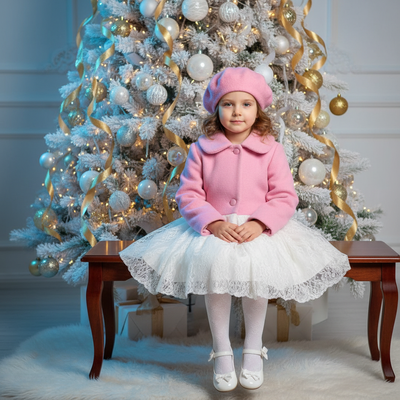
Quick answer: Blush Winter – Elegant Pastel Bench is an AI-generated Christmas photo style from PiXmas featuring a soft white-gold glow, a frosted tree, and a classic wooden bench, with wardrobe shifted into blush, cream, dove gray, and sage tones. Upload one photo (or one per person) through the iOS app, and the scene is composed automatically into a photorealistic, editorial-style holiday portrait.
Blush Winter – Elegant Pastel Bench is the kind of scene you can feel. Imagine a soft white-gold glow settling over a snowy base, a frosted tree shimmering with delicate lights, and a classic wooden bench inviting a calm, graceful moment. Our AI Christmas Photo Studio transforms your uploaded photo or photos into a photorealistic, cinematic portrait that carries the hush and refinement of winter. Wardrobe tones shift gently into elegant pastels, blush, cream, dove gray, and soft sage, so your Christmas Photos look timeless, flattering, and effortlessly polished. Whether it's a single portrait or a shared frame, Blush Winter turns quiet beauty into a lasting holiday keepsake.
Why Choose This Style?
Blush Winter is designed for those who love sophistication without the fuss. The pastel palette and gentle white-gold background create a serene mood that flatters every complexion and age, making it ideal for both children and adults. The glowing frosted tree adds a cinematic sparkle while keeping the focus on the people you love. If you upload one person, they're seated on the wooden bench like a still from a classic holiday film; upload multiple people, and everyone is placed naturally into the same refined setup, connected by soft light and shared warmth. Download our app: Christmas Pictures.
Because this style is created in our AI Christmas Photo Studio, you don't need to book a location, coordinate outfits, or wait for the perfect weather. The wardrobe adapts to pastel and winter elegance automatically, so your look is cohesive and polished without any shopping or stress. The results are crisp and high-resolution for prints, yet soft and luminous for screens, perfect for framed gifts, social sharing, or even a lovely Christmas Wallpaper. It's an easy way to produce beautiful, consistent Christmas Pictures that feel like they were captured in an exclusive studio, without leaving home.
Perfect For These Occasions
Choose Blush Winter when you want holiday imagery that whispers rather than shouts. The calm glow and delicate color story make it a beautiful fit for your annual Christmas Card, especially if you prefer a refined, editorial look. Couples, siblings, and best friends look wonderfully connected when seated together on the bench or gathered beside it; the soft lights and snowy base add just the right touch of magic. Families can create a coordinated series, one portrait of each person and one together, to decorate a mantel or create a gift set for grandparents.
This style also shines for professional-yet-festive portraits: think thoughtful team photos, elegant author headshots for seasonal announcements, or polished images to accompany holiday event invitations. It's perfect for keepsakes that need to stand the test of time, albums, framed prints, or a gallery wall you'll revisit every December. And if you love digital touches, your Blush Winter portrait becomes a graceful lock screen or Christmas Wallpaper that brings daily calm to a busy season.
How to Create Your Blush Winter – Elegant Pastel Bench
Getting started is simple. Upload one photo for a solo portrait or multiple photos to include everyone together. Our AI adapts to your images and places you in front of the glowing frosted tree on a classic wooden bench, aligning posture and perspective for a natural, photorealistic result. Wardrobe styling automatically shifts to pastel winter elegance, soft knits, silky textures, and tailored layers, so everything feels cohesive without manual edits. The snowy base and warm tree lights complete the cinematic mood.
Within minutes, you'll preview your portrait and choose your favorite framing, close, mid, or a bit wider to show more of the scene. Download high-resolution files for prints and albums, and create web-optimized versions for sharing. Crop a vertical for your Christmas Card, save a horizontal as your desktop Christmas Wallpaper, or build a carousel of Christmas Photos for social. Let the soft white-gold backdrop and shimmering tree tell your story with elegance, whether it's a single serene portrait or a tender group moment.
What makes this style different from other Christmas photo styles?
Most Christmas photo styles lean on classic red, green, and plaid. Blush Winter takes the opposite approach, building its mood around a soft white-gold glow and a pastel wardrobe of blush, cream, dove gray, and sage. The frosted tree and wooden bench give it an editorial, magazine-still quality rather than a bright, busy holiday scene, which is why it reads as elegant and calm instead of festive and loud.
What photo should you upload for the best result?
A clear, forward-facing photo with even lighting and an unobstructed face gives PiXmas the most detail to work with. Avoid sunglasses, heavy shadows, or hats that hide the hairline. For a shared portrait, upload a separate clear photo of each person rather than one busy group snapshot, so each face is rendered with the same detail on the bench.
How does PiXmas compare to a photographer or DIY setup?
- Photography educators using Google Trends report that searches for terms like “Christmas card photos” remain fairly constant through much of the year, then trend upward from September or October and spike in December. (Tech Photo Guy – Google Trends for Photographers, 2018)
- A general guide to using Google Trends recommends setting multi‑year ranges to spot seasonality, noting that Christmas‑related terms consistently show seasonal spikes that can guide when to publish holiday photo content. (Cemoh – How to Use Google Trends: A Complete Guide, 2026)
- Google’s Holiday Trends reports that many Christmas‑related queries in the US, including decorating and baking topics, spike each December, illustrating that demand for Christmas imagery and content concentrates late in the year. (Google – Holiday Trends (Year in Search 2025), 2025)
Limitations
Blush Winter portraits are AI-generated stylized images, not physical photographs taken on a real set with a real bench or tree. Fine details like jewelry, fabric texture, or exact pose may vary slightly from the source photo. Photos with several faces in one frame can look a little less consistent than a solo or couple portrait, since the AI is aligning more people to the same pastel scene. PiXmas is a strong fit if you want a fast, coordinated Blush Winter portrait from a phone photo without the cost or planning of a real pastel-toned photoshoot.
For a soft, editorial take on holiday portraits, PiXmas turns a single phone photo into a Blush Winter – Elegant Pastel Bench scene, complete with pastel wardrobe and a glowing frosted tree, without booking a photographer or building a pastel set at home.
Frequently asked questions
What is the Blush Winter – Elegant Pastel Bench style?
It is a Christmas photo style built around a soft white-gold glow, a frosted tree, and a classic wooden bench, with wardrobe shifted into pastel tones like blush, cream, dove gray, and sage for an elegant, editorial holiday look.
Can I use my Blush Winter portrait as a Christmas card?
Yes. PiXmas renders your portrait at high resolution, so you can crop it vertically for a printed Christmas card or keep it horizontal for a digital greeting or wallpaper without losing image quality.
Does this style work for group photos or only solo portraits?
Both work well. Upload one photo for a solo bench portrait, or a photo per person for couples, families, or friend groups, and PiXmas places everyone into the same pastel scene together.
Can I include a pet in the Blush Winter photo?
Pets can often be included alongside family members if the uploaded photo shows them clearly, though this style is primarily designed around people seated on the wooden bench in pastel wardrobe.
Will the AI photo look exactly like my original picture?
PiXmas uses your uploaded photo to guide facial likeness while replacing the background, wardrobe, and lighting with the Blush Winter scene, so the setting is new even though the person is recognizably you.
What kind of source photo works best for this style?
A single, well-lit, forward-facing photo without sunglasses or heavy shadows gives PiXmas the clearest details to build an accurate, photorealistic Blush Winter portrait from one uploaded image.